
Four approaches produce genuinely cohesive team headshots: an in-person studio or photo day, an on-location photographer, guided virtual or self-shoot sessions, and an AI headshot generator, with hybrid setups blending two of these for mixed workforces. Small local teams usually do best with a single studio day, distributed teams lean on guided virtual or AI capture, and large enterprises with strict brand rules often mix a studio session at headquarters with virtual capture for everyone else. If you’re stuck, run a five-person pilot with your top pick before committing the whole company.
TL;DR:
- For large, dispersed teams, guided virtual or AI headshot methods offer faster turnaround and lower costs, but sacrifice some authenticity compared to in-person studio sessions.
- Small teams under 50 staff benefit most from a single studio shoot in one location for maximum consistency and high-quality images, suitable for leadership profiles.
- When planning a rollout, locking visual elements like background color and crop ratio beforehand ensures a professional and cohesive appearance across all team photos.
- Maintaining current team photos requires periodic updates, ideally integrating headshot capture into onboarding processes and enforcing style guidelines for ongoing consistency.
Table of Contents
- Comparing the Four Main Approaches to Team Headshots
- How Do You Choose the Right Headshot Approach for Your Team?
- Planning Your Rollout: A Step-by-Step Checklist and Timeline
- What Does It Cost, and How Fast Can You Expect Delivery?
- What Files and Rights Should You Require From Any Shoot?
- How Agencies Keep Team Headshots Consistent at Scale
- Keeping Team Photos Current Without Redoing the Whole Shoot
- How All City Graphix Handles Brand-Aligned Headshot Rollouts
- Sources
- FAQ
Comparing the Four Main Approaches to Team Headshots
Each approach trades speed for control in a different way, and the right pick depends on how much your team is scattered and how much brand risk you’re willing to carry.
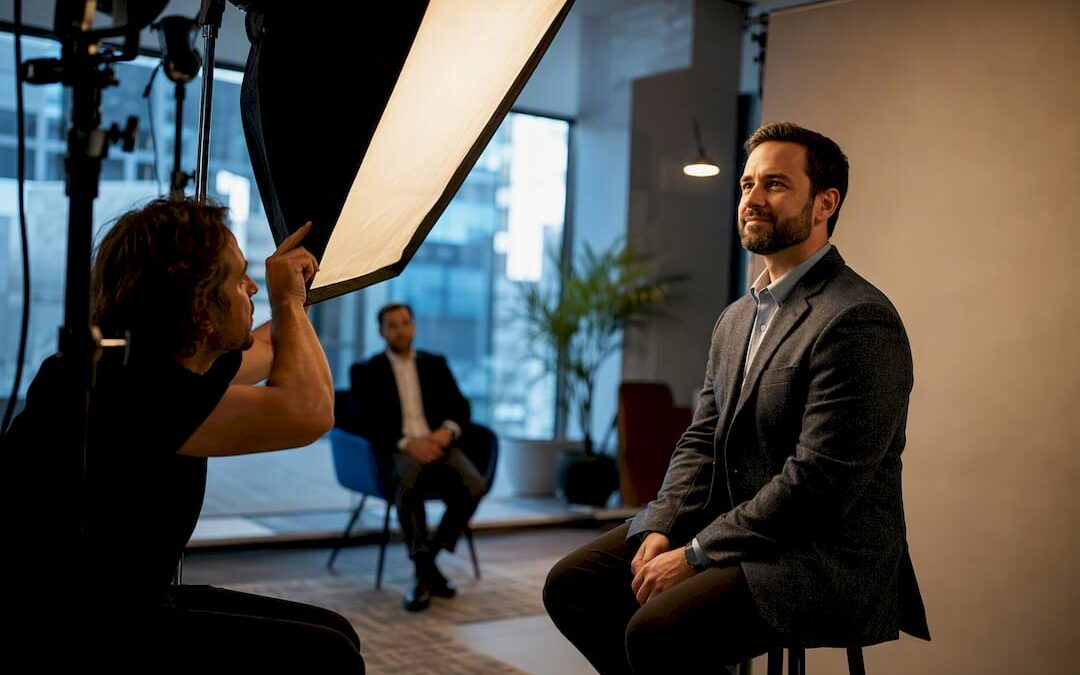
In-person studio or photo day puts everyone in front of the same backdrop, lighting rig, and photographer on the same day. It delivers the highest consistency and the best photographic fidelity, since one professional controls every variable. The catch is logistics: you need a venue, a schedule, and enough advance notice to get people in the same room. This suits small, co-located teams (under 50 people) or headquarters staff at bigger companies.
On-location photography sends a photographer to your office or a rented space near a satellite team. It preserves most of the studio’s visual quality while cutting travel for employees, but it multiplies cost if you have multiple offices, since each location needs its own booking, setup, and travel fee.
Guided virtual or self-shoot sessions have employees take their own photos at home or their desk, following a script a coordinator or app walks them through in real time. This scales to hundreds of remote workers without flights or venues, though quality depends heavily on each person’s phone camera, room lighting, and patience.
AI headshot generators turn a handful of uploaded selfies into a polished portrait using a template background and lighting profile. Nothing beats this for turnaround. Nothing beats an in-person shoot for authenticity, since the PubMed research on facial perception suggests subtle, real visual cues in a portrait shape how viewers judge professionalism and trust, something a synthetic image can approximate but not fully replicate.
Here’s how the trade-offs stack up:
- Studio/photo day: highest fidelity, hardest to scale past one location, best for brand-critical leadership pages.
- On-location: near-studio quality, cost climbs fast with more sites.
- Guided virtual: moderate fidelity, scales well, needs strong art direction to stay uniform.
- AI generator: fastest and cheapest per head, weakest on authenticity, strongest for large distributed rosters on a deadline.
Pro Tip: Whatever approach you choose, lock the background color, crop ratio, and lighting style before a single photo gets taken. Consistency, not raw image quality, is what actually reads as “professional” to a viewer scanning a team page.
That last point isn’t just opinion. Research on rapid social judgment, published in PNAS, found that consistent visual cues speed up and improve first impressions in professional settings, which is exactly why a uniform set of slightly-less-perfect portraits often reads better than a mixed bag of high-end shots. If you’re rolling this out past 50 people, don’t sign anything without admin invites, completion tracking, bulk export, SSO login, and a built-in retake workflow. Without those, someone on your team becomes the manual tracker, chasing down the four people who never uploaded a photo.
How Do You Choose the Right Headshot Approach for Your Team?
Run through these criteria in order. Each one narrows the field before you start requesting quotes.
- Team size and growth rate. Under 20 people, almost any approach works. Past 100, you need bulk invites and tracking or the project stalls.
- Geographic distribution. One office favors a studio day. Five offices or a remote-first company favors virtual or AI capture, since flying a photographer to every location gets expensive fast.
- Brand risk tolerance. A law firm or financial services company with strict brand guidelines usually wants the fidelity of in-person photography, at least for leadership and public-facing bios.
- Budget per head. Decide this number before you start shopping. It filters out entire categories of vendor immediately.
- Timeline. A rebrand launch in three weeks rules out coordinating a multi-city photo tour.
- Intended use cases. Website, LinkedIn, press kit, badge photo, and internal directory each have different resolution and crop needs, and some uses (press, print) demand higher fidelity than others.
Once you’ve ranked these, the decision usually resolves itself. If your team is distributed and speed matters more than polish, go with guided virtual or an AI generator. If you need tight brand control and high visual fidelity for a small, co-located group, book the in-person studio day. If you’re a mid-size company with a headquarters and several remote hires, plan on a hybrid: studio for HQ, virtual for everyone else.
Before signing with any vendor or committing internal resources, ask these questions directly:
- What’s the pricing model: flat rate, per head, or tiered by volume?
- What admin features come with the platform: invite tracking, bulk export, SSO?
- Can you see a sample gallery of finished work from a similar-size team?
- Who owns the usage rights to the final images, and does that cover web, print, and social?
- What’s the retouch policy, and does it cost extra per photo?
Watch for these red flags in any proposal: no bulk export option (you’ll be downloading images one by one), no explicit usage rights language (you might not legally own what you paid for), and a vague or undefined retouch policy that turns into a surprise line item later.
Planning Your Rollout: A Step-by-Step Checklist and Timeline
Break the rollout into five phases and you avoid the two most common failures: inconsistent style and stalled participation.
- Prepare. Lock your background color, crop ratio, and wardrobe guidance in writing before inviting anyone. Build a small sample gallery of two or three approved test shots so employees know exactly what they’re aiming for. Decide how invites go out (email, Slack, or a CSV bulk upload into your chosen platform) and set a firm deadline.
- Capture. Give employees a short instruction sheet: face a window for natural light, hold the camera at eye level, keep the background plain, and avoid harsh overhead lighting that casts shadows under the eyes.
- Review and approve. An admin (usually HR or marketing) checks every submission against the sample gallery for background match, crop, and lighting consistency, and flags anyone who needs a retake.
- Deliver and integrate. Standardize file naming (last name, department code), export the full set as one ZIP, and load images directly into your CMS or employee directory rather than emailing files around individually.
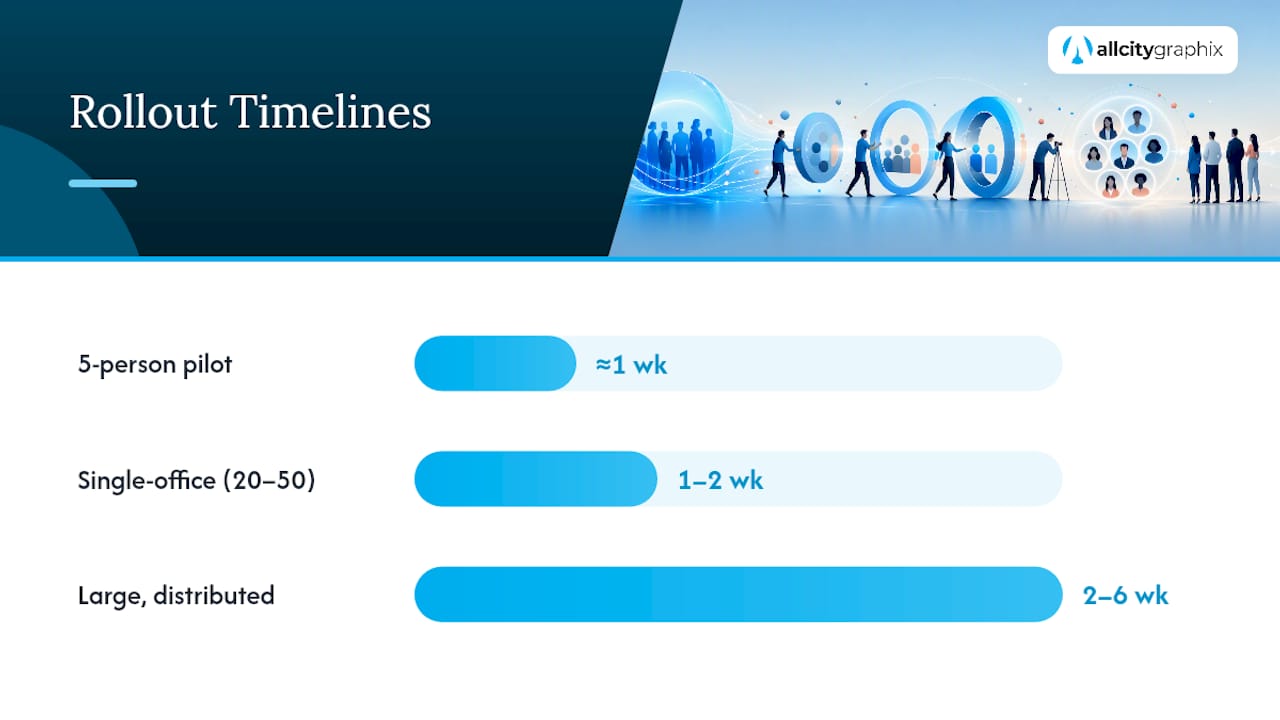
For timing, a five-person pilot takes about a week. A single-office team of 20 to 50 usually wraps in one to two weeks. A large, distributed rollout across multiple offices or time zones can take two to six weeks, mostly depending on how fast people respond to the invite, not how long the actual photography takes.
Pro Tip: Send the retake reminder before the deadline, not after. A single follow-up message two days before the cutoff catches most stragglers without needing a second full review cycle.
What Does It Cost, and How Fast Can You Expect Delivery?
Pricing shifts a lot based on approach, and quotes that look similar on paper often hide very different scopes. Here’s roughly what to expect per person:
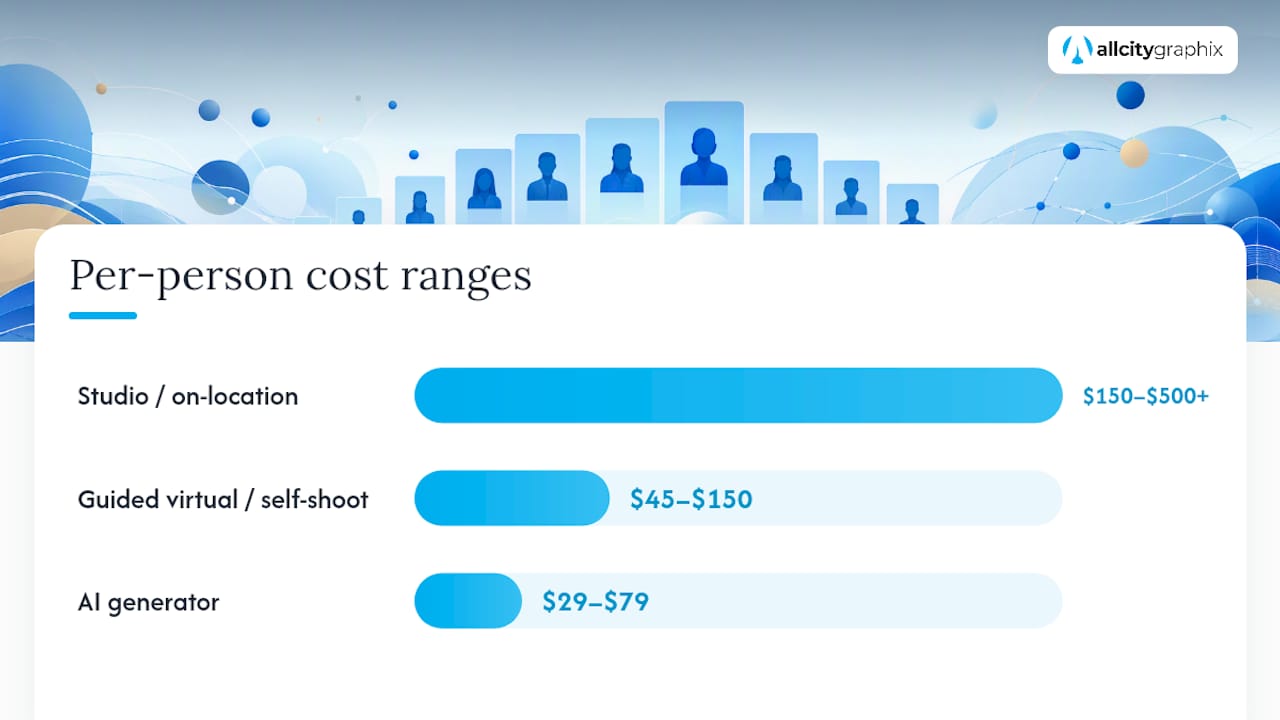
- Studio or on-location photographer: $150 to $500 or more per head, with the range driven by travel fees, session length, and how much retouching is included.
- Guided virtual or self-shoot sessions: $45 to $150 per head, typically scaling down as headcount goes up.
- AI headshot generator: $29 to $79 per head, often with volume tiers that drop the price further past a few hundred users.
Volume changes the math fast. A photographer charging $400 for a ten-person shoot might drop to $200 a head for a 100-person day, since travel and setup costs get spread across more people. Turnaround follows the same pattern in reverse: AI and guided virtual sessions can return a finished headshot in under 30 minutes, while studio or on-location shoots typically take one to fourteen days depending on how much retouching and how many locations are involved.
Watch for costs that don’t show up in the headline price: travel fees for on-location work, venue rental if you don’t have office space that photographs well, expedited retouching for a rushed deadline, usage licensing if you need the images for print or paid advertising beyond your website, and re-shoot fees if someone misses the original session.
What Files and Rights Should You Require From Any Shoot?
Whatever approach you use, request these deliverables up front, in writing, before the shoot happens rather than after you’re negotiating with a vendor who already has your team’s photos.
- High-resolution TIFF, PNG, or JPEG files suitable for print, plus web-optimized JPEGs in the 200 to 400 KB range for fast-loading pages.
- Standard head-and-shoulders crop, with a safe margin around the face so the image works as both a full portrait and a small thumbnail or avatar.
- Transparent-background versions if your design team plans to place employees over branded backgrounds later.
- A clear retouch policy: minor skin and blemish cleanup and background correction are standard; heavy facial alteration should be explicitly opted into, not assumed.
- Written usage rights covering web, print, internal directories, and social media, with clarity on whether rights transfer to your company outright or remain licensed from the photographer.
If you’re collecting employee photos and personal information through a web form for a distributed rollout, build in proper consent handling. A tool like GDPR cookie compliance on your intake page covers the basics for teams gathering images and data online.
How Agencies Keep Team Headshots Consistent at Scale
Agencies solve the consistency problem by anchoring every headshot decision to an existing brand style guide before anyone picks up a camera. Background color, crop, and even facial expression guidance get pulled straight from brand standards, which is why a living style guide matters as much for photography as it does for logos and color palettes.
The hybrid model comes up constantly in practice: one studio session for headquarters staff, paired with virtual or AI capture for remote hires, gets everyone into a matching set without flying a photographer to every city. A typical process runs discovery meeting, style lock, small pilot, full rollout, and then final asset handoff into whatever CMS or directory the client uses. This mirrors how organized team photo sessions in other industries handle bulk deliverables and stakeholder galleries, just adapted for corporate branding rather than sports rosters.
Keeping Team Photos Current Without Redoing the Whole Shoot
Most companies over-invest in the big shoot and under-invest in keeping it current. A full re-shoot every two to four years makes sense when your brand identity shifts, but annual spot updates for new hires and departures keep the directory from looking stale in between.
Build headshot capture into onboarding itself. New hires get their photo on day one or two, using the same locked style guide from the original shoot, so the team page never has an obvious patchwork of old and new visual styles.
Accessibility deserves more attention than it usually gets. Write descriptive alt text for every headshot, check that background and clothing choices provide enough contrast for photos to render clearly at small sizes, and keep wardrobe guidance flexible enough to respect cultural and religious dress across a diverse team.
Between full re-shoots, small tactics keep pages fresh: swap in a new hire’s photo the week they start, retire a departed employee’s image immediately, and do a quick annual audit to catch anyone whose photo is visibly out of date with current hairstyle or appearance.
— Alex
How All City Graphix Handles Brand-Aligned Headshot Rollouts
Some agencies offer comprehensive headshot rollout coordination, starting with a discovery meeting to align headshot style to an existing brand guide and then coordinating a mix of studio sessions and distributed capture as needed.
Running headshots in-house works fine for a ten-person startup with one office. It stops working once you’re juggling multiple locations, a brand style guide nobody follows consistently, and a website that needs those images inserted correctly the first time. That’s the gap All City Graphix closes: we handle the custom photography coordination, the retouch policy, and the CMS integration so the final images land on your site formatted correctly instead of sitting in a shared drive for three weeks. Explore the full service catalog or request a quote to scope your next team photo rollout.
Sources
Background on why facial presentation and visual consistency shape professional impressions comes from PubMed’s research on facial perception and a PNAS study on visual cues in rapid judgment. For vendor vetting on data handling, see AICPA’s SOC guidance, and for consent tooling during image collection, review the GDPR cookie compliance plugin.
- PubMed – Research on facial cues and perception
FAQ
Can ChatGPT Make Me a Professional Headshot?
ChatGPT and similar AI tools can generate a polished-looking portrait from uploaded selfies, but the result is synthetic and won’t capture the same authentic visual cues as a real photograph, which matters for high-visibility leadership bios.
What Colors Should You Avoid Wearing for a Headshot?
Skip pure white (it can blow out against bright backgrounds), busy patterns, and colors that closely match your background, since all three reduce the contrast that makes a headshot read clearly, especially at small thumbnail sizes.
How Much Does a Typical Headshot Cost?
Expect $150 to $500 or more per person for studio or on-location photography, $45 to $150 for guided virtual sessions, and $29 to $79 for AI-generated headshots, with per-head pricing usually dropping as team size increases.
What Makes a Really Good Headshot?
Consistent lighting, a clean background, a natural expression, and a crop that matches the rest of your team’s photos matter more than any single image’s raw photographic quality, since uniformity is what reads as professional across a full team page.