

If you sell almost entirely through a Shopify storefront and stay under mid-market volume, Shopify Payments wins on cost and simplicity. If you run a headless build, a marketplace, complex subscription billing, or sell across multiple platforms, Stripe wins on flexibility. Cross-border mid-market brands often end up running both. The single biggest cost lever is Shopify’s third-party gateway surcharge, which the comparison below breaks into exact numbers.
TL;DR:
- Shopify Payments is more cost-effective for Shopify-native stores processing under $50,000 monthly, as it avoids third-party gateway surcharges that stripe adds on top of processing fees.
- Cross-border brands often use both platforms, relying on Shopify Payments domestically and Stripe internationally for broader country coverage and payment method options.
- For high-volume merchants, negotiating better rates or switching to Interchange-Plus pricing on Stripe can reduce costs, especially once processing exceeds six figures monthly.
- Small businesses benefit from Shopify Protect’s chargeback guarantee for simpler dispute handling, while larger or complex sellers prefer Stripe’s customizable fraud scoring with ML rules.
- The choice of platform should consider not just fees but also billing complexity, international needs, and checkout customizability to maximize conversions and revenue growth.
Table of Contents
- Shopify Payments vs. Stripe: The Side-by-Side Breakdown
- How Do Fees Actually Add Up on a $100 Sale?
- Fraud, Disputes, and Chargebacks: Who Handles What
- Which Platform Fits Your Business Model?
- What Are the Real Engineering Trade-Offs at Checkout?
- Agency Checklist Before You Commit to Either Platform
- How Do Currency Conversion Fees Work on Each Platform?
- What Do the Contract Terms Actually Say About Holds and Termination?
- Is Support Better From Shopify Payments or Stripe?
- The Payment Stack Is Part of Your Conversion Strategy, Not Just Back-Office Plumbing
- Get Your Payment Stack Built Right, Whichever Platform You Choose
- Sources
- FAQ
Shopify Payments vs. Stripe: The Side-by-Side Breakdown
The two platforms look nearly identical on paper until you factor in one policy: Shopify charges a surcharge on every transaction processed through a non-native processor. That single line item decides more merchant choices than any fraud feature or API capability.
| Decision axis | Shopify Payments | Stripe (on or off Shopify) |
|---|---|---|
| Headline online rate | 2.9% + $0.30 (standard plan), lower on higher tiers | 2.9% + $0.30 baseline, custom or Interchange-Plus pricing at volume |
| Shopify gateway surcharge | None, it is the native processor | 0.2% to 2.0% added on top, depending on Shopify plan tier |
| Fraud protection & chargebacks | Shopify Protect offers a chargeback guarantee for eligible Shop Pay orders | Stripe Radar provides configurable rules and optional paid chargeback protection |
| API / headless flexibility | Limited to Shopify’s checkout framework | Full REST API, custom UIs, headless-ready |
| Payment methods | Cards, Shop Pay, major wallets | Cards, wallets, bank debits, BNPL options, broader local methods |
| Countries / local acquiring | Available in a defined set of Shopify markets, expanding via Markets Pro | Broader country footprint and local acquiring in many regions |
| Payout timing & reserves | Typically 1 to 3 business days, standard reserve practices | Similar timing, reserves more configurable for risk profiles |
| Best for | Shopify-native DTC stores at typical mid-market volume | Headless builds, marketplaces, multi-platform sellers, advanced billing |
A few caveats sit just outside that table. Enterprise merchants on either side can negotiate below list price. Stripe’s Interchange-Plus pricing usually only beats Shopify Payments once monthly volume climbs into the six figures and a merchant has leverage to negotiate a lower markup. Shopify’s surcharge percentage also shifts by plan, so a Shopify Plus account pays a smaller penalty for running Stripe than a Basic account does.
Fee math matters more than feature lists for most Shopify merchants under $50,000 in monthly volume. At that scale, the gateway surcharge on Stripe transactions usually outweighs any fraud tooling or checkout flexibility Stripe offers. Above that range, the calculus shifts toward whichever platform gives better authorization rates in your specific markets.
The takeaway: if you’re Shopify-native and domestic, the surcharge decides it. If you’re cross-border or platform-agnostic, country coverage and API access decide it instead.
How Do Fees Actually Add Up on a $100 Sale?
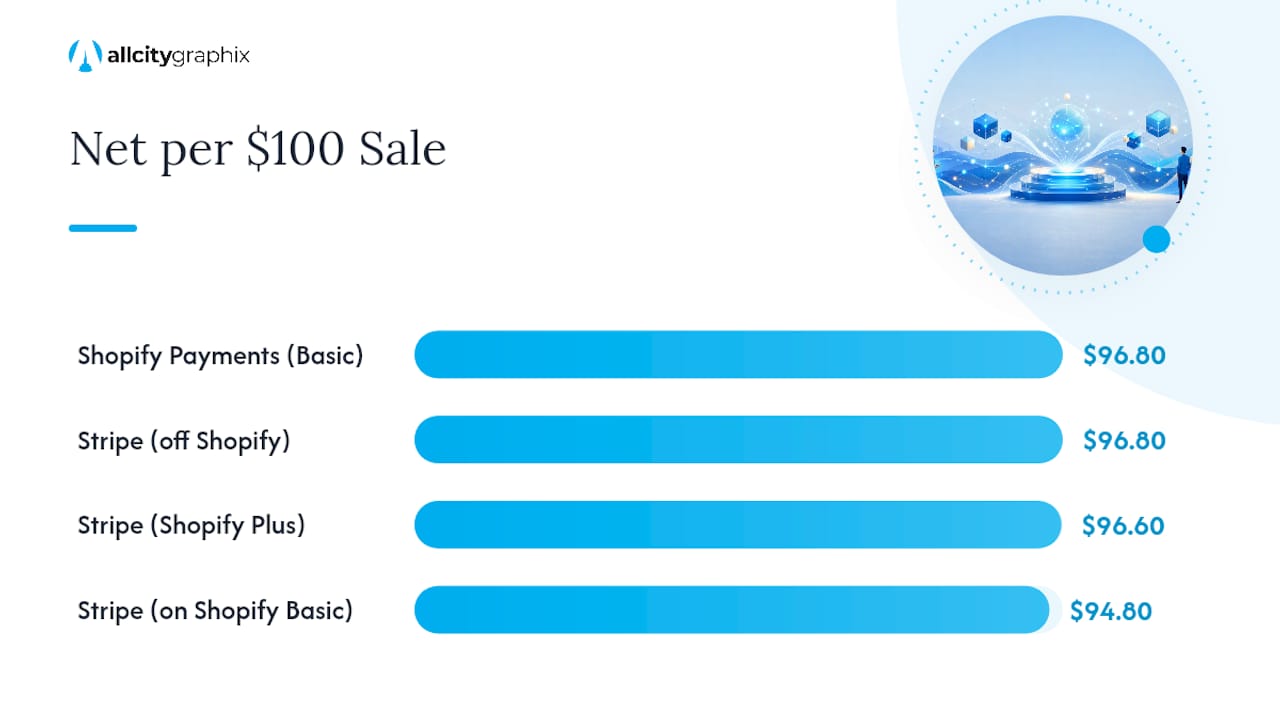
Both platforms quote the same baseline card rate, 2.9% + $0.30, so a $100 sale nets $96.80 before any plan-specific adjustments. That symmetry disappears the moment you run Stripe inside a Shopify store, because Shopify’s third-party gateway surcharge stacks on top of Stripe’s own processing fee.
Here’s the worked example. On Shopify’s Basic plan, the surcharge sits near 2%. Run a $100 sale through Shopify Payments and you keep roughly $96.80 after the standard rate. Run that same $100 sale through Stripe on a Basic Shopify store, and you pay Stripe’s 2.9% + $0.30, then an additional 2% surcharge on top, dropping your net closer to $94.80. That’s a two-dollar swing on every hundred dollars, purely from platform policy, not from anything Stripe itself charges differently.
- Shopify Payments on Basic plan: no surcharge, net about $96.80 per $100 sale
- Stripe on Shopify Basic plan: 2% surcharge added, net ~$94.80 per $100 sale
- Stripe on Shopify Plus: surcharge drops to roughly 0.2%, narrowing the gap to a few cents
- Stripe used off Shopify entirely (its own checkout, no Shopify surcharge): pure 2.9% + $0.30, no penalty
At moderate monthly volumes, that surcharge gap on a Basic or Shopify plan can amount to substantial monthly costs, money that has nothing to do with fraud rates or processing quality.
Interchange-Plus pricing becomes relevant for merchants processing high volumes. Stripe passes through the actual card network interchange fee plus a fixed markup, which can beat Shopify Payments’ blended rate once you’re processing enough card-present or low-risk transactions to shrink that markup meaningfully. Most merchants only get access to genuinely favorable Interchange-Plus terms once they’re processing well past six figures monthly and have a sales rep negotiating on their behalf.
Practically: ask Shopify for a rate review once you cross into Shopify Plus territory, request a Stripe enterprise quote once monthly volume exceeds roughly $80,000 to $100,000, and consider ACH or bank-debit rails for high-ticket B2B orders where card fees eat too much margin.
Fraud, Disputes, and Chargebacks: Who Handles What
Shopify Protect gives eligible Shop Pay orders a chargeback guarantee, meaning Shopify absorbs the loss on qualifying disputes instead of you. Stripe Radar takes a different route: it’s a configurable machine-learning fraud engine that scores every transaction and lets you set custom rules, with optional paid chargeback protection layered on for merchants who want it.
For a two-person operation running a Shopify store, the practical difference is time. Fighting a chargeback yourself means pulling shipping records, screenshotting order confirmations, and hoping your evidence beats the cardholder’s bank. Shopify Protect removes that entirely for qualifying orders, which matters more to a small team than shaving a fraction of a percent off processing costs elsewhere.
- Shopify Protect: automatic guarantee on eligible Shop Pay orders, minimal manual dispute work
- Stripe Radar: rule-based and ML scoring, highly configurable, better suited to teams with dedicated risk staff
- Chargeback fees: both platforms charge a per-dispute fee regardless of outcome, though guarantee coverage can offset the underlying loss
- Optional paid protection: Stripe offers additional chargeback protection at a percentage cost for merchants who want broader coverage than Radar’s default rules provide
Larger sellers running complex catalogs or high-risk categories often prefer Radar precisely because it’s tunable. You can tighten rules around specific SKUs, countries, or order values in a way a flat guarantee can’t replicate. Smaller teams without a dedicated fraud analyst usually come out ahead letting the guarantee do the work instead of building custom rules they don’t have time to maintain.
Pro Tip: If you’re under five people managing the store, prioritize guarantee-backed protection over configurability. The hours saved not fighting individual disputes often matter more than the marginal fraud-catch rate difference between the two systems.
Which Platform Fits Your Business Model?
Matching your business type to the right processor comes down to three questions: where do you sell, how complex is your billing, and do you need marketplace-style payouts to third parties?
- Shopify-first DTC under mid-market volume. If your storefront is Shopify, your checkout is standard, and you’re not running a marketplace, Shopify Payments is built for exactly this. You get Shop Pay’s conversion lift and zero surcharge friction.
- Headless, multi-platform, or subscription-heavy businesses. If you’re selling through a custom-built frontend, syncing inventory across Shopify and a separate app, or running metered billing with proration and dunning logic, Stripe Billing handles that natively in a way Shopify Payments was never designed to.
- Marketplaces paying out to third-party sellers or contractors. Shopify Payments has no mechanism for splitting a transaction across multiple payout recipients. That’s Stripe Connect’s entire purpose, and there’s no Shopify-native substitute for it.
- Cross-border mid-market brands. These businesses frequently land on a hybrid setup: Shopify Payments and Shop Pay for domestic conversion, Stripe for international transactions where local acquiring and broader payment method support improve authorization rates.
A subscription box brand doing metered add-ons and prorated upgrades will hit walls fast when trying to force that logic through Shopify’s native billing. A marketplace connecting buyers to independent sellers needs Connect’s split-payout infrastructure, full stop. The hybrid pattern shows up most often among brands doing $500,000 to $5 million annually who need Shop Pay’s domestic conversion but can’t get acceptable authorization rates internationally without Stripe’s local acquiring reach.
What Are the Real Engineering Trade-Offs at Checkout?
Shop Pay’s accelerated checkout is Shopify Payments’ strongest card. Returning customers check out in one click, and that convenience measurably lifts conversion compared to a standard guest flow. For a founder without an engineering team, that’s a meaningful advantage baked in with zero development work.
Stripe’s answer is composability. Stripe Checkout gives you a prebuilt, hosted page similar in spirit to Shop Pay. Link is Stripe’s own one-click returning-customer flow. Elements lets you build fully custom payment forms inside your own UI. And the underlying API lets a development team construct a headless storefront with checkout logic that Shopify’s native flow simply can’t replicate.
- Use Stripe Checkout or Elements as prebuilt starting points rather than building payment UI from scratch
- Stage rollout in a test environment and run real card scenarios before flipping to production
- Monitor authorization rates by region after launch since local acquiring performance varies more than most teams expect
- Budget engineering time proportional to how custom your checkout needs to be, not proportional to how big your catalog is
Payout timing runs similar on both platforms, typically one to three business days, though reserve policies differ. Stripe can apply rolling or fixed reserves more aggressively on new or high-risk accounts, which affects cash flow in the first few months more than most founders anticipate.
Agency Checklist Before You Commit to Either Platform
Before locking in a processor, run through six questions: which countries do you actually ship to, what channels beyond Shopify do you sell through, what’s your expected monthly volume, how complex is your subscription or billing logic, do you need marketplace payouts, and how much fraud risk can your category tolerate.
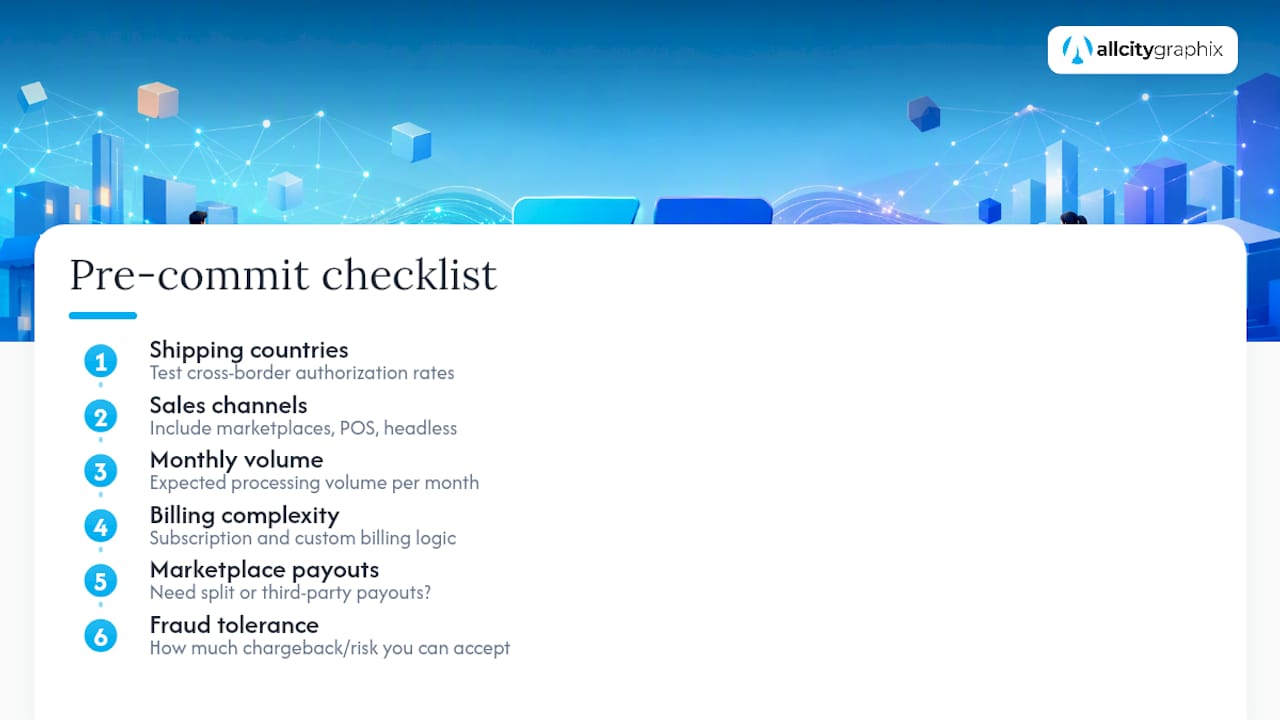
The most common implementation mistake is never testing cross-border authorization rates before launch, only to discover international customers get declined at checkout weeks after going live. A close second is ignoring Shop Pay’s conversion lift entirely, assuming any checkout works the same, then wondering why cart abandonment stays high. A third is underestimating reserve or hold probability on a brand-new account, which can freeze a meaningful chunk of early revenue right when cash flow matters most.
Pro Tip: An implementation partner who has built both Shopify-native and headless Stripe integrations can usually spot which of these six factors will bite you before launch, not after, saving weeks of post-launch firefighting.
How Do Currency Conversion Fees Work on Each Platform?
Multi-currency handling differs in how each platform charges for the conversion, not just whether it’s supported. Shopify Payments settles in your store’s home currency by default, and when a customer pays in a different currency through Shopify Markets, Shopify applies its own conversion rate with a built-in markup over the mid-market rate. That markup is layered into the price shown to the shopper rather than itemized as a separate fee, which keeps checkout simple but makes the true cost harder to isolate.
Stripe handles multi-currency more transparently at the API level. It supports settlement in dozens of currencies, and when a transaction requires conversion, Stripe applies a currency conversion fee on top of its standard processing rate, typically an additional percentage disclosed in your account’s pricing terms. Because Stripe exposes this as a distinct line item, merchants running detailed margin analysis can isolate exactly what conversion costs them per region.
For a brand selling primarily in one currency with occasional international orders, Shopify’s bundled approach is simpler to manage day to day. For a brand doing meaningful volume in three or more currencies, Stripe’s itemized fee structure makes it easier to spot which markets are quietly eating margin through conversion costs alone, separate from processing fees. Either way, model conversion costs separately from your headline processing rate. Folding them together hides where your real margin pressure is coming from.
What Do the Contract Terms Actually Say About Holds and Termination?
Both platforms operate under standard card network merchant agreements, and both reserve the right to place holds or reserves on accounts they flag as high-risk, a pattern more common with new accounts, sudden volume spikes, or categories prone to disputes like subscriptions and travel.
Shopify Payments ties account stability to your Shopify subscription. Suspend or cancel your Shopify plan and payment processing stops with it, since the two are bundled. That bundling is convenient when everything’s running smoothly, but it means a billing dispute on your Shopify account can indirectly disrupt your ability to take payments at all.
Stripe operates as a standalone processor, so your payment processing isn’t tied to any single storefront platform. That independence matters most to merchants running Stripe across multiple sales channels, since closing one channel doesn’t touch the others. Both platforms can trigger a reserve or temporary hold during a risk review, and both publish appeal processes, though resolution speed varies by case complexity and account history. Neither platform guarantees a fixed timeline for releasing a reserve once one is applied.
Read the actual terms for your account tier before assuming either platform’s default behavior. Reserve policies and termination triggers get more lenient at higher plan tiers and higher processing volumes on both sides.
Is Support Better From Shopify Payments or Stripe?
Shopify Payments support runs through Shopify’s existing merchant support channels, meaning you’re often talking to a generalist support agent who handles storefront issues, theme questions, and payment issues in the same queue. That’s convenient for a single point of contact but can mean longer resolution times on payment-specific technical issues that need a specialist.
Stripe support skews more technical by design, reflecting its developer-first audience. Documentation is extensive and frequently cited as an industry reference for API-driven support, which helps engineering teams self-serve rather than wait on a ticket. Direct human support access typically scales with account size and plan tier on both platforms, so a merchant processing $10,000 a month gets a noticeably different support experience than one processing $500,000.
For a founder without technical staff, Shopify’s bundled support means one place to ask questions about anything storefront-related, including payments. For a team with developers who prefer self-service documentation over ticket queues, Stripe’s technical resources tend to resolve issues faster without waiting on a support rep at all.
The Payment Stack Is Part of Your Conversion Strategy, Not Just Back-Office Plumbing
Founders tend to treat payment processor selection as a finance decision, filed away after the initial setup and forgotten. It isn’t. Checkout friction, authorization failures, and clunky dispute handling all bleed directly into conversion rate and repeat purchase behavior, the same metrics your branding and site design are supposed to protect. A processor choice that saves you half a percent in fees but costs you international authorization rate is a net loss dressed up as a savings.
Run the fee model on your actual volume before deciding anything. Test Shop Pay against your current checkout to see the real conversion delta. If you’re closing in on six-figure monthly volume, request a Stripe enterprise quote before assuming Shopify Payments is automatically cheaper.
— Alex
Get Your Payment Stack Built Right, Whichever Platform You Choose
Picking between Shopify Payments and Stripe is only half the job. The bigger lift is making sure your checkout, storefront, and conversion flow actually take advantage of whichever processor you land on, and that’s the part most founders run out of time or expertise to handle alone. An experienced agency builds and optimizes Shopify storefronts and headless checkout integrations so the technical decision you just made actually pays off in real conversion numbers.

A few quick wins that come standard with a checkout-focused build:
- Faster checkout load times that reduce drop-off before payment even starts
- Shop Pay integration tuned for maximum conversion lift on returning customers
- A/B testing across checkout flows to measure what actually moves your conversion rate, not just what looks better
Whether you’re staying Shopify-native or building toward a headless Stripe integration, a properly built checkout is what turns the processor decision into real revenue. Visit the All City Graphix services page to talk through your setup and get a plan for your storefront.
Sources
- Shopify Help — Shopify Payments
- Stripe — Pricing
- Shopify Payments vs. Stripe in 2026: Which commerce payments stack wins? — Ecommerce Times
FAQ
How Much Does Shopify Take From a $100 Sale?
With Shopify Payments on the standard plan, expect around $96.80 net after the 2.9% + $0.30 rate. Running Stripe instead on that same plan adds a gateway surcharge, dropping your net closer to $94.80.
Which Payment Provider Is Best for Shopify?
Shopify Payments is generally best for Shopify-native stores under mid-market volume because it avoids the third-party gateway surcharge entirely. Stripe becomes the better fit once you need headless flexibility, marketplace payouts, or heavier international acquiring.
Who Is Stripe’s Biggest Competitor?
In the Shopify ecosystem specifically, Shopify Payments is Stripe’s most direct comparison point, since both process the same baseline card transactions but differ sharply on fees, flexibility, and country coverage.
What Are the Disadvantages of Using Stripe on Shopify?
Stripe on Shopify also lacks the native Shop Pay conversion integration that Shopify Payments gets by default.