

Local business schema is a JSON-LD code block you place on a location page that tells search engines the exact name, address, phone number, hours, and geographic coordinates of your business. It gives Google machine-readable data that supports knowledge panels and AI-generated answers, though it won’t single-handedly win you a spot in the map pack. The next move is simple: add one validated JSON-LD block to each physical location page and test it before you publish.
TL;DR:
- Ensuring your JSON-LD includes accurate name, address, phone number, and coordinates formatted with uppercase months, country codes, and HTTPS URLs is essential for validation.
- Each location page must have a unique schema block with a distinct
@id, matching its specific address and data to prevent conflicts in multi-location setups.- Choosing the most precise schema subtype, such as
Restaurantfor food businesses orService-area businessfor delivery services, unlocks valuable, category-specific properties.- Regularly validate schema after every website update using tools like the Rich Results Test to catch common issues like NAP mismatch, malformed JSON, or missing geo coordinates.
- Keeping schema data consistent with your Google Business Profile and updating it immediately for changes in hours, contact info, or address prevents search engine confusion and potential ranking drops.
Table of Contents
- What Belongs in a Local Business Schema Checklist?
- How Do You Add JSON-LD to a Location Page?
- What Do JSON-LD Examples Look Like for Different Business Types?
- How Should Multi-Location and Service-Area Businesses Structure Schema?
- How Do You Validate Schema and Fix Common Errors?
- How Do You Keep Local Business Schema Accurate Over Time?
- An Agency’s Take on the Schema Mistakes That Actually Cost Rankings
- Let All City Graphix Handle Your Schema Implementation
- Sources
- FAQ
What Belongs in a Local Business Schema Checklist?
Before you write a single line of code, run through what actually needs to be in the block. Google’s own guidance on LocalBusiness structured data lays out a short list of properties that carry real weight and a longer list that strengthens the entity without being strictly mandatory.
Required properties:
name: the exact business name, matching your Google Business Profile character for character.address: a nestedPostalAddressobject with street, city, state, ZIP, and country.telephone: the phone number in a consistent, correctly formatted string.url: the canonical HTTPS URL of the location page.
Recommended properties that function as near-required:
geo: latitude and longitude, ideally to five or more decimal places for precision.openingHoursSpecification: hours written in 24-hourhh:mmformat, broken out by day.image: at least one representative photo URL, ideally your storefront or logo.priceRange: a rough indicator like$$for user-facing context.sameAs: links to verified social profiles and directory listings.
Google’s documentation treats geo coordinates and opening hours as effectively necessary for solid entity confidence, even though its schema doesn’t flag them as strictly required.
A few formatting habits will save you from failed validation later. Always use 24-hour time for hours (09:00, not 9:00 AM). Include the country code on phone numbers (+1 for U.S. numbers). Use HTTPS for every URL field, and make sure the name, address, and phone number match your Google Business Profile down to the abbreviation style: “St.” on your site but “Street” on your profile is enough to create a mismatch flag.
Pro Tip: Keep a single spreadsheet with your canonical NAP (name, address, phone) for every location, and copy from it every time you touch schema, your website footer, or your Google Business Profile. Most inconsistency problems start because someone typed the address from memory instead of copying it.
How Do You Add JSON-LD to a Location Page?
JSON-LD wins over Microdata and RDFa for one practical reason: it’s a self-contained script block that doesn’t touch your visible HTML. You can hand it to a developer, drop it into a CMS field, or inject it through a plugin without restructuring a single tag on the page. The Schema documents the full property set this format supports, and it’s the format nearly every implementation guide recommends by default.
Place the <script type="application/ld+json"> block in the <head> of the location page. Some CMS platforms only allow body injection, and that works too. What matters more is that the block lives on the specific page it describes, not buried in a global template shared across unrelated pages.
Here’s a production-ready example for a single location:
<script type="application/ld+json">
{
  "@context": "https://schema.org",
  "@type": "LocalBusiness",
  "@id": "https://example.com/locations/downtown#business",
  "name": "Example Coffee Downtown",
  "image": "https://example.com/images/downtown-storefront.jpg",
  "telephone": "+1-212-555-0134",
  "url": "https://example.com/locations/downtown",
  "address": {
    "@type": "PostalAddress",
    "streetAddress": "142 West 23rd Street",
    "addressLocality": "New York",
    "addressRegion": "NY",
    "postalCode": "10011",
    "addressCountry": "US"
  },
  "geo": {
    "@type": "GeoCoordinates",
    "latitude": 40.74256,
    "longitude": -73.99345
  },
  "openingHoursSpecification": [
    {
      "@type": "OpeningHoursSpecification",
      "dayOfWeek": ["Monday", "Tuesday", "Wednesday", "Thursday", "Friday"],
      "opens": "07:00",
      "closes": "18:00"
    },
    {
      "@type": "OpeningHoursSpecification",
      "dayOfWeek": ["Saturday", "Sunday"],
      "opens": "08:00",
      "closes": "16:00"
    }
  ],
  "sameAs": [
    "https://www.facebook.com/examplecoffeedowntown",
    "https://www.instagram.com/examplecoffeedowntown"
  ]
}
</script>
Every property in that block earns its place. @id gives the entity a stable, unique identifier that other markup on your site (breadcrumbs, an Organization block) can reference instead of duplicating the same data. geo needs decimal coordinates, which you can pull from Google Maps by right-clicking a pin and copying the numbers it displays. openingHoursSpecification uses arrays so you’re not repeating identical blocks for each weekday. Phone numbers should include the +1 country code even for domestic-only businesses, since crawlers process international format more reliably than the format your customers dial.
The table below breaks down where each value typically comes from when you’re gathering data for a build.
| Property | Where the value comes from |
|---|---|
name |
Copy verbatim from your Google Business Profile |
geo coordinates |
Right-click the pin location on Google Maps |
telephone |
Add +1 prefix to your listed number |
image |
Use a stable, hosted URL, not a CDN link that expires |
@id |
Construct as page URL plus a fragment, e.g. #business |
For deployment, the rule is one block per page, matched to that page’s location. Multi-location sites should never copy the same JSON-LD across pages describing different addresses. If you only have one location, a fallback block on your homepage or contact page covers you. If you run five locations, you need five distinct blocks, each with its own @id and address.
What Do JSON-LD Examples Look Like for Different Business Types?
Schema.org documents dozens of LocalBusiness subtypes, and picking the closest match to your actual business unlocks properties that the generic LocalBusiness type doesn’t support. A restaurant using the generic type misses out on fields built specifically for food service, while a Restaurant subtype can carry servesCuisine and menu directly.
Restaurant (extends LocalBusiness with food-specific fields):
{
  "@type": "Restaurant",
  "name": "Example Bistro",
  "servesCuisine": "Italian",
  "menu": "https://example.com/menu",
  "priceRange": "$$"
}
Dentist (a medical-adjacent subtype):
{
  "@type": "Dentist",
  "name": "Example Dental Group",
  "medicalSpecialty": "Dentistry"
}
Service-area business (no walk-in storefront, defined by coverage area instead of address):
{
  "@type": "Plumber",
  "name": "Example Plumbing Co.",
  "areaServed": {
    "@type": "GeoCircle",
    "geoMidpoint": {
      "@type": "GeoCoordinates",
      "latitude": 33.749,
      "longitude": -84.388
    },
    "geoRadius": "40000"
  }
}
Generic LocalBusiness fallback (when no subtype fits cleanly):
{
  "@type": "LocalBusiness",
  "name": "Example General Store"
}
The properties each subtype unlocks matter more than they look. A restaurant gets servesCuisine and menu. A dentist gets medicalSpecialty and can nest into MedicalOrganization fields for insurance or department details. A retail store might use department to describe sub-sections within a larger location.
Three things to keep in mind when picking a subtype:
- Search schema.org’s type hierarchy for your exact category before defaulting to generic
LocalBusiness. - If no exact subtype exists, choose the closest parent type rather than inventing a nonstandard one.
- Revisit your subtype choice if your business model changes, such as adding delivery-only service that shifts you from a storefront type to a service-area type.
How Should Multi-Location and Service-Area Businesses Structure Schema?
Every physical location needs its own validated JSON-LD block with a unique @id, tied to that location’s own page. Google’s structured data guidance is direct about this: mash multiple locations into one block and you create confusion about which address, phone number, and hours belong to which entity.
- Build one location page per address, each carrying its own complete JSON-LD block.
- Give each block a unique
@id(a common pattern is the page URL plus a fragment like#business) so other schema on your site can reference it without duplication. - For service-area businesses with no public storefront, use
areaServedwith aGeoShapeorGeoCircleinstead of publishing a residential or unlisted address. - Tie service-area schema to the specific service or lead-generation page it describes, not a generic “about us” page.
Scaling this across ten, fifty, or two hundred locations is where most teams get stuck. A content template with placeholder fields for name, address, phone, hours, and coordinates works fine for a handful of locations. Past that, pull data from a structured feed (a spreadsheet or database export) and generate the JSON-LD server-side, either at build time for static sites or dynamically through a CMS plugin that reads from your location data source. The location page SEO playbook from Corvane Systems covers the broader page architecture question that schema sits inside, which matters just as much as the markup itself for multi-location brands.
How Do You Validate Schema and Fix Common Errors?
Run three checks before you consider a schema implementation done: the Rich Results Test, a general schema validator, and Search Console’s enhancement reports after the page goes live. The Schema Markup Validator catches structural problems the Rich Results Test sometimes misses, since it validates against the full schema.org vocabulary rather than only the subset Google surfaces in rich results.
The most frequent failures aren’t exotic. They’re the same handful of mistakes showing up on client site after client site:
- NAP mismatch: your schema says “142 W 23rd St” but your Google Business Profile says “142 West 23rd Street.” Synchronize both to one canonical format.
- Malformed JSON: a missing comma or unclosed bracket breaks the entire block silently. Paste your code into a JSON linter before deploying.
- Wrong time format:
9:00 AMinstead of09:00. Structured data expects 24-hourhh:mmnotation. - Missing geo coordinates: leaving out
latitudeandlongitudeweakens entity confidence even though it won’t throw a hard error. - Marking up reviews that aren’t visible on the page: adding
AggregateRatingfor reviews the page doesn’t display is a policy violation, not just a technical slip.
Fix order matters. Start with NAP consistency, since it’s the error most likely to confuse Google about whether your schema and your Business Profile describe the same entity. Then run the JSON through a linter, check time formats, confirm geo data is present, and finally audit any review or rating fields against what’s actually visible on the page.
Pro Tip: Bookmark your Search Console property’s enhancement report for structured data and check it after every site redesign or CMS migration. Schema blocks break silently during migrations more often than almost any other on-page element, and nobody notices until rankings slip.
How Do You Keep Local Business Schema Accurate Over Time?
Schema isn’t a set-it-and-forget-it task. A location that changes its hours for the holidays, updates its phone system, or moves three blocks over needs its JSON-LD updated the same day the visible page content changes. Mismatched schema is worse than no schema, since it signals unreliable data to Google rather than simply omitting information.
- Treat schema and visible page content as one unit. If your hours change on the page, they change in the JSON-LD at the same time, using the same canonical NAP format across your website, your Google Business Profile, and every directory listing.
- Automate what you can. If your CMS or a location-data plugin can pull hours and contact fields from a single source of truth, use it, so an update in one place propagates everywhere instead of requiring five manual edits.
- Monitor Search Console after every deploy. A site update, theme change, or plugin conflict can silently strip or corrupt a schema block, and the enhancement report is usually the first place that shows up.
- Stay inside the rules on reviews and ratings. Only mark up
AggregateRatingorReviewdata that’s genuinely displayed on that page, and never aggregate ratings you don’t have direct rights to publish.
Pro Tip: Set a recurring quarterly reminder to spot-check your top five location pages against your current Google Business Profile listings. Businesses move, renovate, add locations, and change hours more often than their schema gets updated to match.
Schema alone won’t push you into the local pack. Google’s own ranking signals for map pack placement still lean heavily on your Business Profile completeness, proximity to the searcher, and review volume. What schema does is make sure the data behind those signals is machine-readable and consistent, which removes one more variable that could work against you.
An Agency’s Take on the Schema Mistakes That Actually Cost Rankings
Most schema problems aren’t complicated. They’re careless. The three mistakes that show up most often when reviewing a new client’s site are painfully simple to name and just as simple to fix, which is exactly why they’re frustrating to keep seeing.
The first is NAP drift. A business’s address gets typed slightly differently on the website footer, the schema block, and the Google Business Profile, and nobody notices until rankings stall. The fix is always the same: pick one canonical format and copy it everywhere, no exceptions.
The second is treating multi-location sites like single-location sites. One schema block gets duplicated across five location pages with only the address swapped, and the @id values collide or get forgotten entirely. Every location needs its own page, its own block, and its own identity.
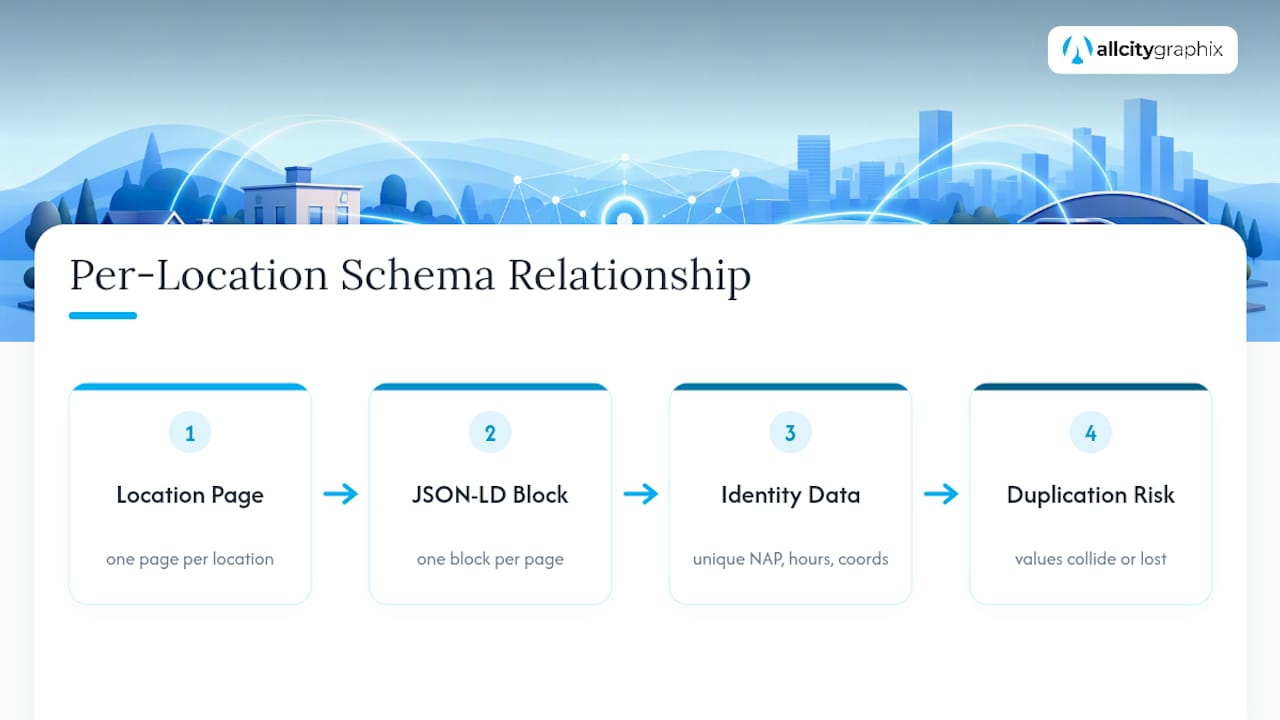
The third is skipping validation entirely. A block that looks right in the code editor can still fail silently because of a missing comma or a wrong property name. Running the Rich Results Test takes two minutes and catches problems that would otherwise sit unnoticed for months.
If you’re handing this off to a developer, give them the exact NAP for every location, the geo coordinates, formatted hours, and image URLs before they start, along with a request to validate before deployment. That one step prevents most of the back-and-forth that eats up a project timeline. For a broader look at how this fits into a citywide strategy, the local SEO playbook for NYC neighborhoods walks through how schema, Business Profile data, and content work together at scale.
— Alex
Let All City Graphix Handle Your Schema Implementation
This agency offers a comprehensive approach by handling the strategy, the code, and ongoing local SEO work together, aiming to prevent issues between departments. For each location page, this includes building a custom JSON-LD block aligned with the Google Business Profile, providing validation reports, and performing follow-up checks after launch to ensure accuracy.

If you’re comparing quotes from other providers, ask exactly what’s included: per-location code, a written validation report, and a post-launch monitoring step should all be part of the deliverable, not billed as extras. Vague promises of “SEO optimization” without a concrete schema deliverable are a red flag. All City Graphix’s Search Engine Optimization work folds schema implementation into a broader local visibility plan rather than treating it as an isolated checkbox.
Ready to see where your current markup stands? Request a schema and local SEO audit through the All City Graphix services page and get a clear list of what’s working, what’s broken, and what to fix first.
Sources
- Local Business (LocalBusiness) Structured Data | Google Search Central
- Schema
- LocalBusiness Schema: Complete Guide (2026)
FAQ
What Is a Local Business Schema?
Local business schema is structured data, usually written in JSON-LD, that describes a physical business location’s name, address, phone number, hours, and coordinates in a format search engines can read directly. It’s built on the LocalBusiness type defined by Schema.org, which also includes dozens of specific subtypes for different business categories.
Can You Give an Example of a Local Business Schema?
A basic example includes @type: LocalBusiness, a name matching your Google Business Profile, a nested address object, telephone, url, and a geo object with latitude and longitude. The full annotated JSON-LD example earlier in this guide shows every property working together on a single location page.
How Do I Add a Local Business Schema to My Website?
Write the JSON-LD block using the required and recommended properties, then place it inside a <script type="application/ld+json"> tag in the page’s head or body. Validate it with the Schema Markup Validator or Google’s Rich Results Test before publishing, and repeat the process for each physical location on a multi-location site.
What Is a Business Schema?
“Business schema” usually refers to the broader Organization type or the more specific LocalBusiness type in Schema.org’s vocabulary, both used to describe a company’s identity in structured data. For any business with a physical address customers can visit, LocalBusiness and its subtypes are the more accurate and useful choice.
Does Adding Schema Guarantee Better Local Rankings?
No. Schema improves how clearly search engines understand your business data, but map pack rankings still depend primarily on your Google Business Profile completeness, proximity to the searcher, and review signals. Treat schema as a foundation for accuracy, not a ranking shortcut.