

The best default brochure size is US Letter, 8.5 by 11 inches, folded in tri-fold: it fits standard printers, slides into a #10 envelope, and keeps postage predictable. If Letter does not fit your content, consider Legal, Tabloid, A4, Half Letter, DL, or square formats. Before you commit to any size, confirm it matches your envelope, printer, and postage requirements.
TL;DR:
- The most mail-friendly brochure size is the US Letter tri-fold, which folds to about 3.67 by 8.5 inches and fits easily into standard #10 envelopes.
- Panels in a Letter tri-fold have different widths, with the inward tuck panel approximately 3.625 inches wide, narrower than the outer panels, to prevent buckling.
- Choosing larger formats like Tabloid or Legal increases production costs and postage, requiring larger envelopes and higher rates unless content demands extra space.
- Files should include 0.125-inch bleed, safe margins of at least 0.125 inches, and images at 300 DPI to ensure proper print quality and fold alignment.
- Common design rules favor starting with a Letter tri-fold for general purposes, confirming dimensions with a proof, and planning postage costs before full production.
Table of Contents
- Standard brochure sizes and their folded dimensions
- Fold types and the math behind panel widths
- How to choose a brochure size for mail, cost, and distribution
- File setup: bleed, safe zone, resolution, and export settings
- Choosing paper weight and finish for the size and use
- Special formats and when they earn their cost
- How an agency approaches size and fold decisions
- Rules of thumb for picking a brochure size fast
- How All City Graphix can help with brochure design and print files
- Sources
- FAQ
Standard brochure sizes and their folded dimensions
Most brochure projects start from a small set of flat sheet sizes, each suited to a different budget, printer, and folding style. Knowing the flat dimensions and what they become once folded saves a redesign later.
- Letter (8.5 x 11 in / 216 x 279 mm): folds to about 3.67 x 8.5 inches in tri-fold or 5.5 x 8.5 inches in bi-fold; prints on any office printer and fits a #10 envelope.
- Legal (8.5 x 14 in / 216 x 356 mm): gives extra panel width for menus or detailed spec sheets; a tri-fold lands around 4.7 x 8.5 inches.
- Tabloid (11 x 17 in / 279 x 432 mm): a common trade-show and gatefold size; bi-fold produces two 8.5 x 11 inch panels per side.
- A4 (210 x 297 mm): the standard outside North America, according to ISO 216, which defines the A-series and confirms that A5 is exactly half of A4; A4 tri-folds create panels close to 99 x 210 mm.
- A5 (148 x 210 mm): half of A4, useful for compact flyers or single-fold pieces that need to feel less bulky than a full sheet.
- Half Letter (5.5 x 8.5 in): a small, budget-friendly single-panel size for handouts and quick-reference cards.
- DL / rack card (99 x 210 mm or roughly 3.9 x 8.5 in): the standard European mailer width and a common North American rack-card size, built to slot into countertop displays.
- Square formats (5 x 5 in, 6 x 6 in, 8.5 x 8.5 in): chosen for visual distinction rather than mailing efficiency.
Letter and DL sizes are the two most mail-friendly options because they fit standard #10 envelopes without extra folding or custom packaging. Tabloid and larger gatefolds usually need a 9 x 12 inch envelope or a flat mailing category, which changes your postage math before you even get to design.
Fold types and the math behind panel widths
Folding decisions change your panel count, reading order, and file setup as much as the sheet size does. Here is what each fold does and how the panel widths actually work out.
A bi-fold creates two panels per side by folding a sheet once down the middle, giving four total panel faces to design across front and back. A tri-fold uses two parallel folds to create six panels, read like a small booklet: cover, back, and four inside panels. A Z-fold also has two folds but alternates direction, so the sheet opens accordion-style instead of tucking inward. A gatefold folds both edges inward to meet in the center before a final fold closes the piece, often used for a dramatic reveal. A roll fold (or rollover fold) wraps each panel around the next in sequence, useful for step-by-step content that reads panel to panel.
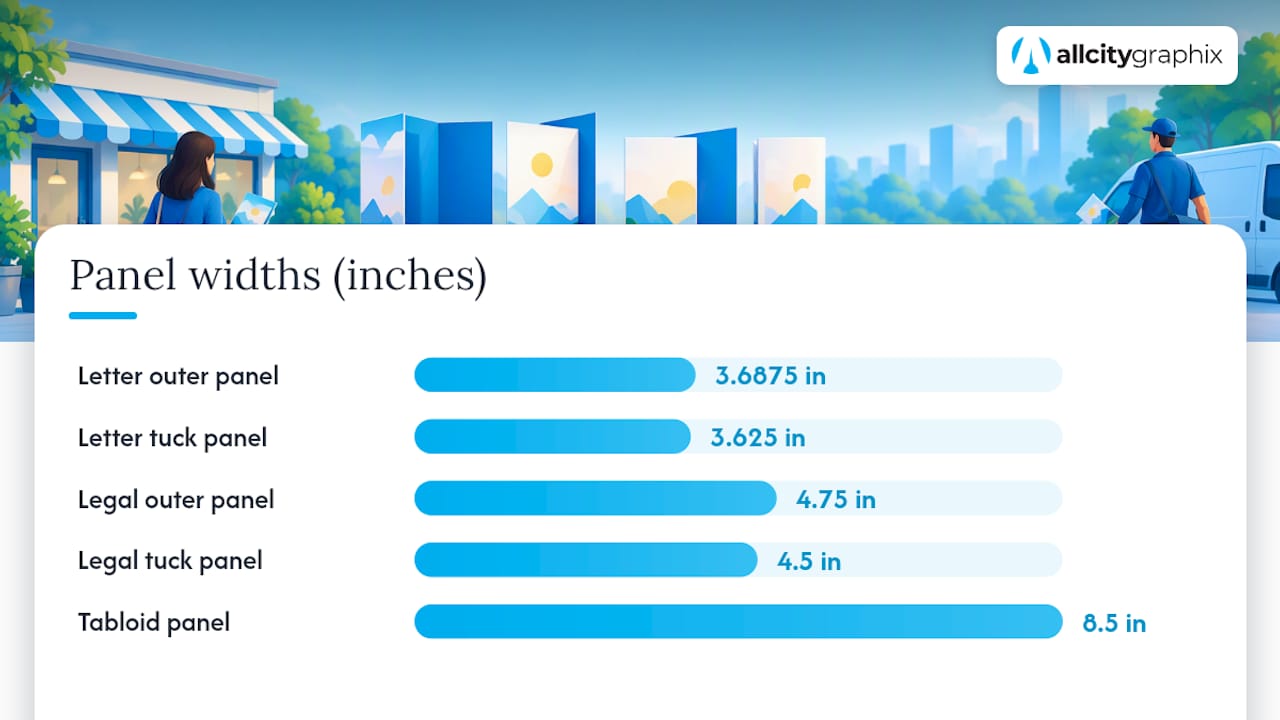
Tri-fold panels are not equal width, and this trips up a lot of first-time designers. On an 8.5 x 11 inch sheet, the panel that folds inward (the tuck panel) needs to be slightly narrower than the other two so it tucks cleanly without buckling, according to Printability, which lists panel widths of roughly 3.6875, 3.6875, and 3.625 inches for a standard Letter tri-fold.
Here is how that math plays out across common flat sizes:
- Letter (8.5 x 11 in) tri-fold: panels at approximately 3.6875 in, 3.6875 in, and 3.625 in (tuck panel narrower).
- Legal (8.5 x 14 in) tri-fold: panels around 4.75 in, 4.75 in, and 4.5 in, keeping the same tuck-panel logic scaled up.
- Tabloid (11 x 17 in) bi-fold: two even panels of 8.5 x 11 inches each, since bi-folds don’t need a narrower tuck panel.
- A4 (210 x 297 mm) tri-fold: panels close to 100 mm, 100 mm, and 97 mm, following the same principle at metric scale.
A quick fold-buckling checklist before you send files to print: confirm the tuck panel is narrower by roughly 1/16 to 1/8 inch, check that panel content lines up across the fold line, verify your printer or press can score (not just fold) heavier stocks, and test-fold a proof copy by hand before a full run.
Pro Tip: Download a printer’s fold template or ask your print vendor for their exact panel guide, since trimming and folding tolerances vary slightly by press and can shift a design by a millimeter or two.
How to choose a brochure size for mail, cost, and distribution
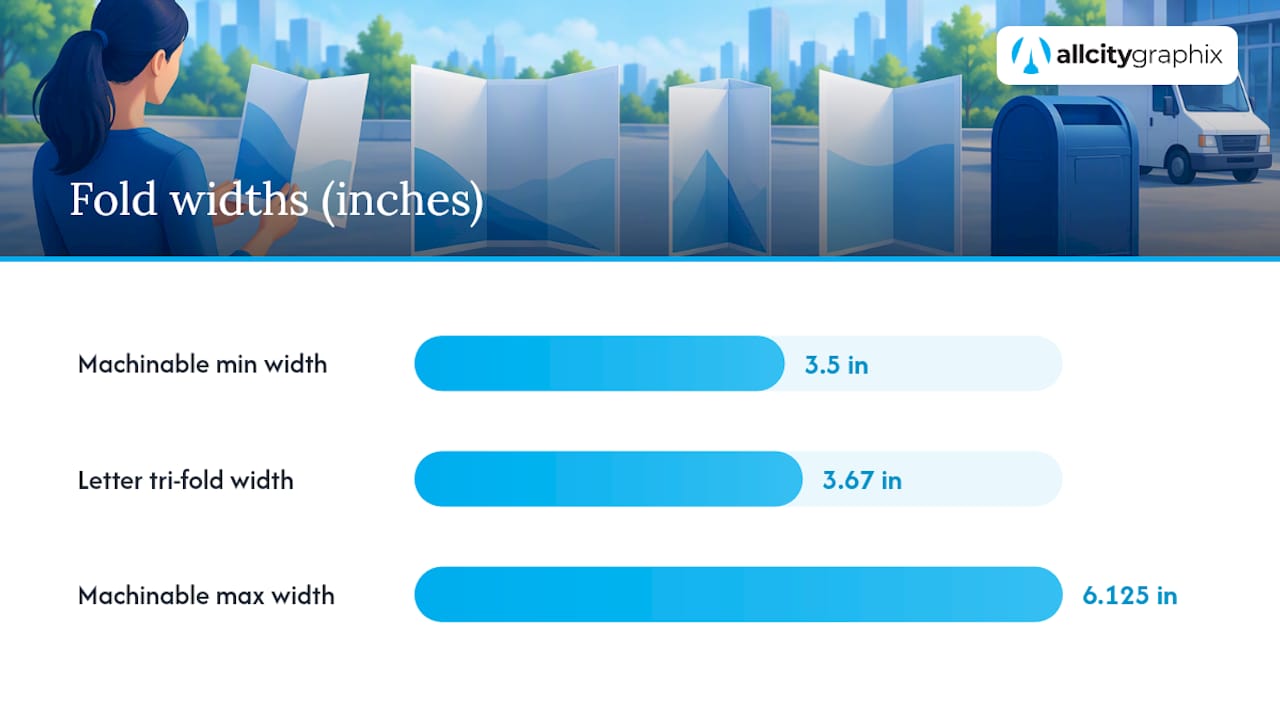
Size choice is a budget and logistics decision as much as a design one. USPS Publication 25 sets machinable letter-mail dimensions between 5 x 3.5 inches minimum and 11.5 x 6.125 inches maximum, with separate thickness and weight limits; pieces that exceed those bounds, or that have rounded corners beyond 1/8 inch, get pushed into flat or non-machinable rate categories that cost more to send.
That single rule explains why the Letter tri-fold dominates direct mail: its folded panel of roughly 3.67 x 8.5 inches sits comfortably inside machinable letter dimensions, while a folded Tabloid gatefold does not.
Recommended picks by common project:
- Direct-mail appeal: Letter tri-fold, folds to machinable letter size, and mails without a custom envelope.
- Product spec sheet: Legal or Tabloid bi-fold, giving more room for technical detail without added folds.
- Restaurant menu: Legal tri-fold or an 11 x 17 inch bi-fold, both durable enough for repeated handling.
- Event program: A5 or Half Letter booklet format, compact for handheld use during a show or ceremony.
Postage tiers depend on both size and thickness. A brochure that qualifies as machinable letter mail typically costs less to send than one bumped into the flat-rate category, according to the same USPS mailpiece design standards. That difference compounds fast across a mailing list of any real size, which is why confirming dimensions before printing matters more than most small business owners expect.
Production cost also rises with sheet size because larger formats yield fewer pieces per press sheet, a factor printers call nesting efficiency. Custom envelope sizes for oversized folds add another line item, so a larger format is usually only worth it when the content genuinely needs the space, such as a trade-show handout with technical diagrams or a gatefold meant to create a visual moment at a product launch.
File setup: bleed, safe zone, resolution, and export settings
Print files fail for the same handful of reasons every time: missing bleed, text too close to the trim edge, low-resolution images, or the wrong color mode. Getting these right on the first try saves a reprint.
Standard bleed is 0.125 inches (1/8 inch) on every edge, and any background color or image meant to run to the paper’s edge must extend into that bleed area, per Adobe Express’s print setup guidance. Safe margins should keep critical text at least 0.125 inches inside the trim line, and 0.25 inches is safer for anything you cannot afford to lose to a trimming shift.
For image resolution, 300 DPI is the standard for sharp print output. A Letter-size panel at 300 DPI needs source images sized around 2,550 by 3,300 pixels before bleed, and a full Tabloid sheet needs roughly 3,300 by 5,100 pixels.
0.125 in |
Set your document to CMYK color mode before you start designing, since RGB files shift color unpredictably once printed. Outline or embed all fonts, include crop marks in your export, and save as PDF/X, a format built for reliable commercial print output.
A short preflight checklist before you hit send: bleed extended on all sides, trim line confirmed, safe zone respected for text, crop marks included, images linked or embedded at 300 DPI, transparency flattened, and one proof reviewed before the full run.
Choosing paper weight and finish for the size and use
Paper stock affects how a brochure folds, mails, and feels in someone’s hand, and the wrong choice shows up immediately in a crease that cracks or a sheet that feels flimsy.
- 80 to 100 lb text weight works well for Letter-size tri-folds meant for mailing, light enough to fold cleanly without extra scoring.
- 100 to 120 lb text or cover stock suits Tabloid pieces and gatefolds, where heavier paper keeps a larger sheet from feeling floppy, a point echoed in 4OVER4’s fold and size guide.
- Cover stock (80 lb cover and up) makes sense for pieces meant to last, like restaurant menus or trade-show leave-behinds handled repeatedly.
Gloss finish brings out photography and saturated color, which suits product catalogs and food photography but can reduce text legibility under glare. Matte finish reads better for text-heavy pieces and gives a quieter, premium feel that fits professional service brands. Silk (or satin) finish splits the difference, offering some sheen without full gloss reflectivity.
For mailed pieces, avoid coatings and weights that crack along the fold line, and check with your printer that your chosen stock meets minimum weight for machine-fed mailing equipment, since paper that is too thin can jam postal sorting machines.
Special formats and when they earn their cost
Square brochures, extended gatefolds, and multi-page booklets exist for a reason beyond novelty: they signal that a brand invested extra effort, which matters for portfolio pieces, luxury retail, or a product launch built around a reveal moment.
- Square formats stand out on a table or rack simply by breaking the expected rectangle shape.
- Extended gatefolds create a reveal effect useful for before-and-after content or a hero product shot.
- Multi-page booklets suit catalogs or annual reports where content volume outgrows a single folded sheet.
The hidden costs come from press imposition waste (nonstandard sizes rarely nest efficiently on a standard press sheet), custom envelope sourcing, and higher postage since these formats usually fall outside machinable letter dimensions. Storage and fulfillment also get more complicated with oversized or oddly shaped pieces.
Before committing to a full print run on a specialty format, order a small test batch and physically fold a proof copy. A design that looks right on screen can still buckle or misalign once it meets a real press and folding machine.
How an agency approaches size and fold decisions
Every brochure brief starts with the same question: where will this piece live? A trade-show handout aimed at a booth table works well as a Tabloid bi-fold, since the larger panels hold product photography and specs without crowding. A direct-mail piece meant to reach a mailbox works best as a Letter tri-fold, sized to machinable postage rates from the start. A restaurant menu built for repeated handling often lands on a Legal bi-fold or a folded 11 x 17 inch sheet, both durable enough to survive a dinner rush.
Before briefing a designer or printer, a small business owner should be ready to answer a few questions: What is the brochure’s objective? Where will it be distributed? What image assets already exist? What feel or tone should the design carry? What is the budget? Are there mailing constraints to design around?
All City Graphix works through these questions during discovery meetings before recommending a size or fold, drawing on more than 15 years of graphic design and branding project experience across trade show booth design and print collateral for small businesses and established brands alike.
Rules of thumb for picking a brochure size fast
Default to a Letter tri-fold unless your content or distribution plan gives you a specific reason not to. Upgrade to Legal or Tabloid only when the extra panel space solves a real content problem, not just because it looks more substantial. Always order a physical proof and fold it by hand before approving a full print run, since screens hide fold and trim problems that paper reveals instantly.
Pro Tip: Order a printed proof even for a small run. A five-dollar test copy catches a folding error that a full print order would turn into a much more expensive mistake.
Plan your postage strategy before you finalize your size, not after the files are already at the printer.
— Alex
How All City Graphix can help with brochure design and print files
Picking the right size is half the job; producing a clean, print-ready file that survives folding, mailing, and a real press run is the other half. All City Graphix handles both sides through its graphic design services, building brochure layouts with correct bleed, safe zones, and panel math built in from the first draft, then coordinating with print vendors so the file that leaves our studio is the file that comes off the press correctly.

Before reaching out, gather your brochure copy, logo files, a rough sense of preferred size and fold, and your distribution plan, whether that’s a mailing list, a trade-show table, or a retail counter. If your brochure is part of a larger event push, our event design team can coordinate the printed piece alongside booth and signage work. Reach out through our services page to start a discovery conversation and get a quote scoped to your size, fold, and print run.
Sources
For deeper technical detail, see USPS Publication 25 on mailpiece dimensions, ISO 216 on the A-series paper standard, and USPS Business Mail 101 for folded mailpiece design rules. For planning printed collateral alongside branded merchandise, Discount Swag’s promotional product campaign guide is a useful companion resource.
- USPS mailing standards — Publication 25 (postal regulations)
- Printability
- Bleed and print setup guidance — Adobe Express
FAQ
Is a brochure A4 size?
A brochure can be A4 size, but A4 (210 x 297 mm) is the standard flat sheet size outside North America rather than a folded brochure size itself, as defined by ISO 216. Once folded in tri-fold, an A4 sheet produces panels close to 100 mm wide, similar in proportion to a Letter tri-fold.
What are the dimensions of a 3-fold brochure?
A standard 3-fold (tri-fold) brochure starts from an 8.5 x 11 inch Letter sheet and folds into panels of roughly 3.6875, 3.6875, and 3.625 inches, according to Printability.app’s brochure sizing guide. The tuck panel is slightly narrower so it folds inside the other two cleanly.
Can a brochure be 12 pages?
Yes, a 12-page brochure is possible using a saddle-stitched booklet format rather than a simple folded sheet, typically built from multiple sheets folded and stapled together. This format suits catalogs or detailed product guides where a single folded sheet doesn’t hold enough content.
What is the size of a 2 fold brochure?
A 2-fold (bi-fold) brochure made from a standard Letter sheet folds to two equal panels of about 5.5 x 8.5 inches each. Larger flat sizes like Tabloid (11 x 17 in) produce bi-fold panels of 8.5 x 11 inches each, useful for trade-show and spec-sheet content.