

On-page SEO is everything you control on the page itself: the title, headings, copy, URL, images, internal links and the way the page loads. The checklist below walks through each item in the order we work through it, from picking the right search intent to checking results in Google Search Console. Use it on a new page before it goes live, or on an existing page that is stuck on page two.
TL;DR
- Start with search intent. Look at what Google already shows for the query, then build the page type that matches it.
- Give every page a unique, descriptive title, one clear H1, a short URL and a meta description that summarizes the page.
- Write people-first content: answer the question directly under each heading, show real expertise and leave nothing the reader still needs to look up.
- Add descriptive alt text, relevant internal links and a clean technical base: crawlable, mobile-friendly, fast.
- Measure in Google Search Console, then review and update pages on a regular schedule.
Table of Contents
- What on-page SEO covers (and what it doesn’t)
- The checklist at a glance
- Step 1: Start with search intent
- Step 2: Pick one primary topic per page
- Step 3: Write a title that earns the click
- Step 4: Use one clear H1 and a logical heading structure
- Step 5: Keep the URL short and readable
- Step 6: Write a meta description that summarizes the page
- Step 7: Make the content genuinely useful
- Step 8: Optimize images
- Step 9: Build internal and external links
- Step 10: Check the technical basics
- Step 11: Measure, then improve
- How often should you update a page?
- Our perspective
- Need a hand applying this checklist?
- FAQ
- Sources
What on-page SEO covers (and what it doesn’t)
On-page SEO means optimizing a webpage so it is relevant, useful and easy for both people and search engines to understand. Search Engine Land describes it as work on content, keyword-rich headings, internal links and descriptive image file names. Technical elements such as speed, indexability, mobile-friendliness and schema sit next to it, and we include the essentials below because a page can’t perform if Google can’t crawl it.
Off-page SEO, mainly links and mentions from other sites, is a separate job. If local citations and links are what you need, our guide to fixing citations and pitching local links covers that side.
One principle runs through the whole list. Google’s Search Essentials recommend helpful, people-first content, the words people search for in prominent places, crawlable links and good practice for images, video and structured data. Nothing on this checklist works as a trick. Each item makes the page clearer to a reader first.
The checklist at a glance
| Step | What to check | Done when |
|---|---|---|
| 1. Intent | Page type matches what the results show | You can say in one sentence what the visitor wants |
| 2. Keyword | One primary topic per page | No other page on your site targets the same query |
| 3. Title | Unique, descriptive, concise | Reads well as a search result |
| 4. H1 and headings | One H1, logical subheadings | Headings alone outline the page |
| 5. URL | Short and readable | A stranger could guess the topic |
| 6. Meta description | Unique summary | Describes the page’s most relevant points |
| 7. Content | Answers the query first | Reader gets what they came for |
| 8. Images | Sharp, near related text, alt text | Every meaningful image is described |
| 9. Links | Descriptive internal and external links | Anchor text says where the link goes |
| 10. Technical | Mobile, speed, indexing, sitemap | Search Console shows the page indexed |
| 11. Measure | Queries, clicks, conversions | You know which pages to improve next |
Step 1: Start with search intent
Before you touch a tag, decide what the searcher wants. The quickest method is to search the keyword yourself and read the results. If the first page is full of step-by-step guides, a sales page won’t rank. If it is full of service pages, a long blog post is the wrong format. Ahrefs recommends checking the current results to see which intent Google appears to satisfy before you decide what type and scope of page to create, and we agree with that habit even though we don’t use their tools.
Take the query behind this page. People who search for an on-page SEO checklist want a list they can work through. That is why you are reading a list, not an essay.
Write the intent down in one sentence: “This page helps a small business owner check a page before publishing.” If you can’t, the page will probably wander, and wandering pages rarely satisfy anyone.
Step 2: Pick one primary topic per page
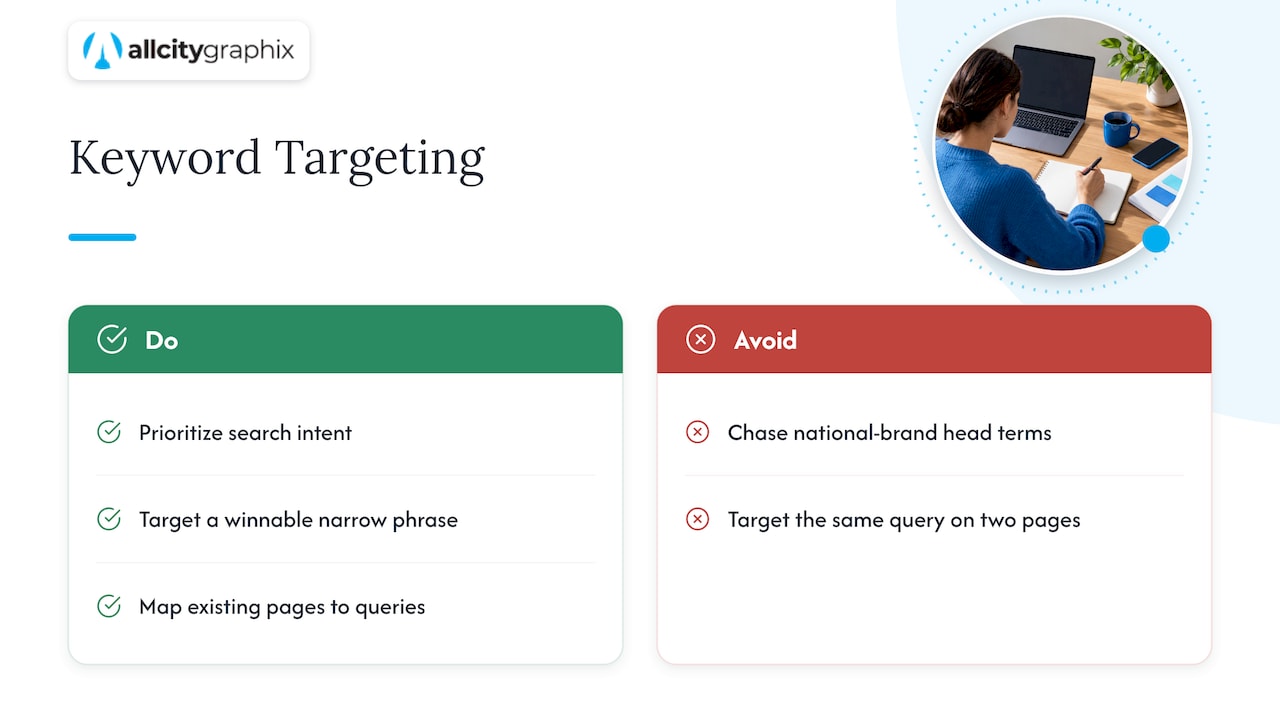
Each page should have a main topic, plus the closely related questions people ask about it. Choose that topic using search volume, how hard the term is to win and, above all, intent. A small site usually does better targeting a narrower phrase it can actually win than a head term dominated by national brands.
The bigger risk on small sites is overlap. Two pages chasing the same query split your own signals. Before writing anything new, map your existing pages to queries. Our five-step keyword mapping process shows how to group queries into intent clusters and test whether two keywords deserve separate pages or one.
Matching copy to what the searcher is trying to do also applies outside agencies. A service business in any trade has to pick words customers really use. One example from another industry is this walkthrough on how to track keywords and improve online visibility for a service business, which shows how a local provider can connect search terms to the pages that answer them.
Step 3: Write a title that earns the click
The title is the strongest on-page signal you control and the first thing a searcher reads. Google’s guidance on title links says every page should have a specified title element, and that titles should be descriptive, concise and unique, without keyword stuffing or repeated boilerplate.
A working routine:
- Put the primary topic near the front, in natural wording.
- Describe what the page really delivers. If it is a checklist, say so.
- Keep it short enough that it won’t be cut off in results. A common rule of thumb is about 60 characters, though display widths vary.
- Make it different from every other title on your site. A template that adds the same suffix to every page wastes space.
- Add your brand at the end only when there is room.
A weak title: “Home | Services | Best Prices | Call Now”. A stronger one: “Commercial Kitchen Cleaning in Queens | Brand Name”. The second one tells Google and the searcher exactly what the page is.
Step 4: Use one clear H1 and a logical heading structure
Use a single H1 that matches the page’s topic. It can be a little more descriptive than the title, but the two should clearly describe the same page. Under it, use H2s for the main sections and H3s for details inside a section. Don’t skip levels to get a different font size; that’s what styling is for.
A good test: read only the headings. If they give you a faithful outline of the page, the structure works. Google’s starter guide says to break long content into paragraphs and sections and to use headings that help users navigate.
For each heading, make the first sentence underneath answer the heading directly. That helps skimmers, and it also makes each section easy to understand on its own.
Step 5: Keep the URL short and readable
A URL like /services/web-design tells people and search engines what to expect. A URL like /p?id=4829&cat=7 tells them nothing. Search Engine Land lists the URL among the prominent places to use the primary topic naturally, so include it, without padding the address with extra words.
Set the URL once and leave it alone. If you must change it, redirect the old address to the new one so you keep the visitors and the history. Where several addresses show the same content, use a canonical link to point to the preferred one.
Step 6: Write a meta description that summarizes the page
Google says snippets usually come from the page content, and sometimes from the meta description. Its starter guide recommends a short, unique description that summarizes the page’s most relevant points.
That means two things for you:
- Write one for every important page, and never copy the same one across pages.
- Treat it as a promise, not a ranking lever. State what the visitor will get and, where it fits, one reason to choose you.
Expect Google to rewrite it sometimes, depending on the query. That is normal, and a clear description still gives it better material to work with.
Step 7: Make the content genuinely useful
This is where most pages win or lose. Google’s people-first guidance asks whether the content offers original information or analysis, shows expertise, and leaves the reader feeling they learned enough to reach their goal. It treats originality, first-hand expertise and accuracy as quality signals, not word count.
In practice:
- Lead with the answer. Put the main point in the first paragraph, then support it.
- Use what only you know. Prices ranges you have seen, mistakes you fix every week, photos of your own work, a local detail. Competitors can’t copy your experience.
- Cover the follow-up questions. Look at the “People also ask” box and the questions customers send you.
- Write naturally. Use the keyword and its variants where they fit. If a sentence sounds odd read aloud, rewrite it.
- Keep it current. Out-of-date prices, outdated screenshots and expired offers erode trust.
Length should follow the topic. A page on “emergency plumber in Astoria” doesn’t need 3,000 words. A full guide does.
Step 8: Optimize images
Images help people understand a page, and they can bring search traffic of their own. Google’s starter guide advises sharp, clear images placed near relevant text, with descriptive alt text.
- Name files for what they show:
brooklyn-bakery-storefront.jpg, notIMG_2043.jpg. - Write alt text that describes the image in plain words, as you would to someone who can’t see it. Don’t stuff it with keywords.
- Compress images so they don’t slow the page, and don’t upload a 5 MB photo to display at 600 pixels wide.
- Use original photography where you can. A real photo of your team or work says more than a stock image does, and it is one more thing nobody else has.
Step 9: Build internal and external links
Internal links tell visitors and Google which pages matter and how topics relate. Google recommends linking to relevant internal and external resources with descriptive anchor text, so people and Google can understand the destination before they click.
Good anchor text names the topic: “our local SEO guide”. Weak anchor text says “click here” or “read more”.
A simple routine for each new page:
- Link to two or three older, related pages from the new one.
- Go back to those older pages and link to the new one.
- Link to your most important service or product page from relevant articles.
- Cite outside sources where they back up a claim.
Navigation matters too. If visitors can’t find the next page, neither can crawlers. Our piece on website navigation for designers explains how clear menus help usability and conversions.
Step 10: Check the technical basics
Technical SEO is a deeper subject, but a few checks belong on every on-page list.
Crawling and indexing. Make sure the page can be crawled and isn’t blocked by a stray noindex tag. Digital.gov advises publishing a robots.txt file and an XML sitemap and using canonical links and robots meta tags to help control crawling and indexing. Submitting a sitemap can help Google find your content.
Mobile-friendly design. Most of your visitors are probably on phones. If your layout breaks on a small screen, fix that first. Our responsive web design guide explains how adaptable layouts work.
Speed and stability. Google’s Core Web Vitals guidance recommends these targets for a good experience:
| Metric | What it measures | Good |
|---|---|---|
| LCP (Largest Contentful Paint) | Loading | Within 2.5 seconds |
| INP (Interaction to Next Paint) | Responsiveness | Below 200 milliseconds |
| CLS (Cumulative Layout Shift) | Visual stability | Below 0.1 |
Don’t chase a perfect score. Google says there is no single page-experience signal. Pages should be secure, mobile-friendly, free from intrusive interstitials and excessive distracting ads, and make the main content easy to tell apart. Aim for a good overall experience.
Structured data. Where it applies (products, local businesses, FAQs, articles), add structured data following Google’s guidelines. It helps search engines interpret the page.
Step 11: Measure, then improve
On-page work is a cycle, not a launch task. Google Search Console lets you verify indexing, see errors and exclusions, inspect individual URLs, submit or monitor sitemaps and review performance by query, page and country.
Two tools, two jobs. Google says Search Console is the source of truth for impressions and clicks in Google Search, while Google Analytics is the source for on-site behavior and conversions. Use the first to see how people find you and the second to see what they do next.
A simple monthly routine:
- Open the Performance report and sort by pages with many impressions but few clicks. These usually need a better title or description.
- Find queries where you rank on page two. Strengthen the content and add internal links.
- Check the indexing report for errors or exclusions on pages that should be live.
- Inspect any newly published URL and confirm it is indexed.
- Look at conversions in Analytics for your top landing pages.
Give changes time before judging them. Search results move slowly, and changing a page every few days makes it hard to know what worked.
How often should you update a page?
There is no fixed number of days. Google recommends checking previously published content and updating it when needed, or deleting it when it’s no longer relevant. A workable rhythm for a small business is a quick review of your top pages every quarter, with a deeper rewrite when facts, prices, services or search results change.
Our perspective
Most checklists treat on-page SEO as boxes to tick. In our experience the boxes are the easy part. The hard part is deciding what the page is for, who it is for and what you want them to do next. That’s a business question before it’s a search question.
This is why we start with discovery, not with tags. We sit down with the owner, look at the customers, the competitors and the sales goal, and only then decide what each page should say and how it should look. A well-written title on a page that is confusing, slow or off-brand will still lose the visitor. Design, copy and SEO work best when the same team handles them.
We also think the work shouldn’t stop at launch. Pages age, search results shift and customers change what they ask. Ongoing support, with someone senior who knows your business reviewing what Search Console shows, is how a site keeps growing instead of drifting.
Alex
Need a hand applying this checklist?
If you’d rather have a team handle it, All City Graphix is a New York City creative agency that combines branding, web design and digital marketing, including SEO, content marketing and website maintenance. We start with a discovery meeting, build a plan around your goals and keep supporting the site after launch.
See our full list of services or get in touch through our homepage to talk about your site. If you sell locally, our SEO guide for small businesses and NYC local SEO playbook are good next reads. Online store owners can use our Shopify SEO checklist.
FAQ
What are the most important on-page SEO factors?
Three matter most: content that matches the searcher’s intent, a clear title and heading structure, and a page that loads and works well on mobile. Google’s own guidance stresses helpful, people-first content and a good overall page experience, not any single signal. Fix those before you spend time on smaller details.
How long does on-page SEO take to work?
There is no guaranteed timeline, because it depends on your competition, your site’s history and how quickly Google recrawls the page. After you publish changes, you can request indexing with the URL Inspection tool in Search Console, then watch impressions and clicks over the following weeks. Judge results over weeks, not days.
Do small businesses need on-page SEO?
Yes, because it is the part of SEO you fully control. A local business with clear titles, accurate service pages, real photos and fast mobile pages gives Google plenty to work with, even against bigger names. Pair it with a Google Business Profile and local citations if you serve a specific area.
What’s the difference between on-page and technical SEO?
On-page SEO deals with what is visible on the page: content, titles, headings, images and internal links. Technical SEO deals with how the site is built and delivered: speed, crawling, indexing, security and structured data. They overlap, and both need to work for a page to perform.
Should I put my keyword in every heading?
No. Use the main topic naturally in the title, H1, introduction and a relevant subheading, and let the other headings describe their sections. Repeating the same phrase in every heading reads badly and doesn’t help you rank.
Sources
- What Is On-Page SEO? Key Elements & Best Practices (Search Engine Land)
- Google Search Essentials
- How to Rank for a Keyword (Ahrefs)
- Influencing Title Links in Google Search
- SEO Starter Guide: The Basics (Google Search Central)
- Creating Helpful, Reliable, People-First Content
- Advanced search engine optimization (Digital.gov)
- Understanding Core Web Vitals and Google search results
- Understanding Google Page Experience
- How To Use Search Console
- Using Search Console and Google Analytics Data for SEO