

A design brief is a short document that spells out a project’s purpose, scope, deliverables, timeline, and how you’ll measure success. It exists so a designer starts building the right thing on the first try instead of the third.
Start now: copy this line and fill it in before you read further: Objective: “Redesign our homepage to increase demo signups.” Deliverable: “One responsive homepage template in Figma.” That’s a working brief seed. The sections below cover every field a complete brief needs, plus seven copy-ready examples for common project types.
- Objective line + one deliverable (copy above and adapt)
- Audience, timeline, budget, and success metrics (covered in Section 4)
- Three worked examples: logo, website, marketing asset (Section 6)
Key Takeaways
A design brief with a clear objective, named audience, and defined deliverables prevents the “wrong direction” rework that drives most project delays and cost overruns.
| Point | Details |
|---|---|
| Start with one sentence | Write the objective as a single measurable sentence before adding any other field. |
| Match format to project size | Use a one-page template for small jobs, an extended version for multi-channel launches. |
| Name one point of contact | Assign a single approver so sign-off never stalls on a group decision. |
| Attach assets, don’t promise them | Send brand files and specs with the brief, not after the designer starts. |
| Treat the brief as living | Kanban-style cards keep scope visible on the board instead of frozen in a document. |
Table of Contents
- What Is a Design Brief, and How Does It Differ From a Creative Brief?
- Why Bother Writing a Design Brief at All?
- What Fields Belong in Every Design Brief?
- How Do You Actually Write One, Step by Step?
- What Do Real Design Brief Examples Look Like?
- Which Template Format Should You Use?
- What Mistakes Cause the Most Rework?
- How Do Agencies Actually Use Briefs on Real Projects?
- Where Can You Find More Templates and Examples?
- Sources
- FAQ
What Is a Design Brief, and How Does It Differ From a Creative Brief?
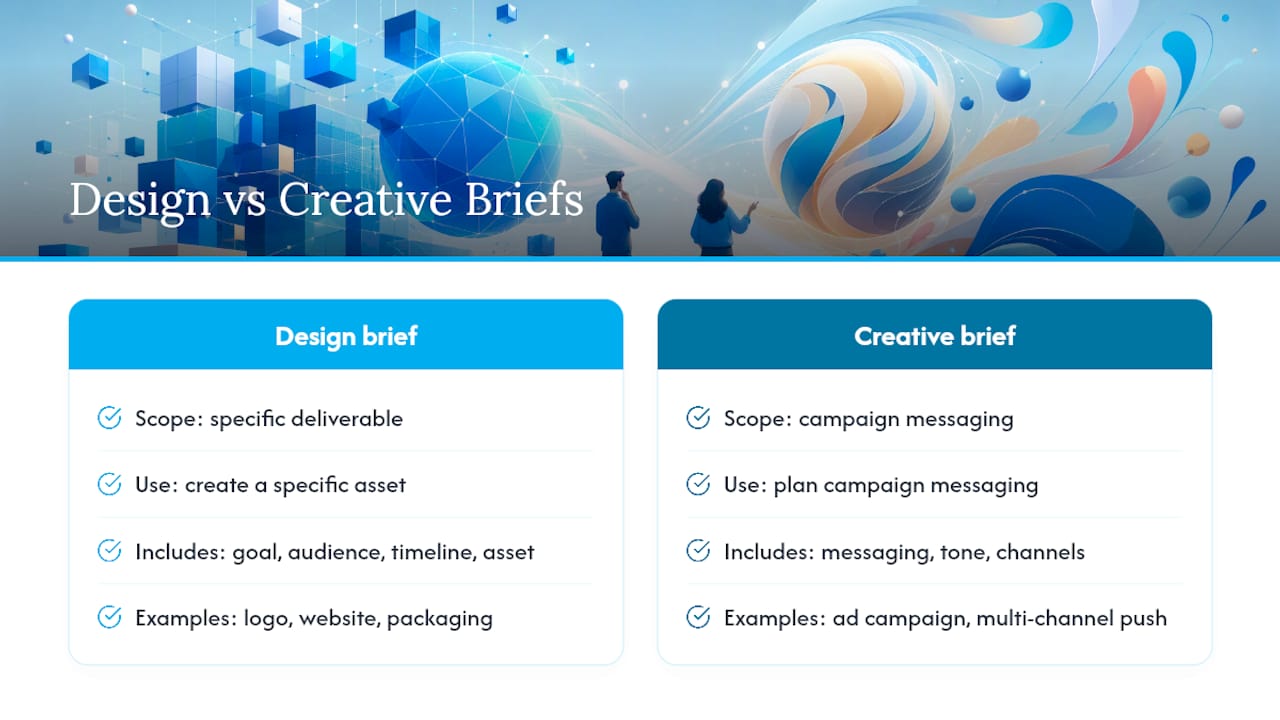
A design brief is a scoped document naming a specific deliverable: a logo, a website, a packaging redesign. It defines what gets built, for whom, by when, and how you’ll know it worked.
A creative brief operates one level up. It’s built for campaign messaging, tone, and channel strategy, the kind of thing an agency writes before a multi-channel ad push. Canva’s documentation draws this line clearly: design briefs anchor to project scope and deliverables (a web page redesign, a new logo), while creative briefs anchor to campaign-level messaging. Both need clear goals, a defined audience, and a timeline, but a design brief is the one you write when you need a specific asset made, not a campaign launched.
Why Bother Writing a Design Brief at All?
A brief written well the first time is the cheapest hour you’ll spend on a project. Skip it, and you pay for it later in revision rounds.
- Alignment. Everyone signs off on the same objective before pixels get drawn.
- Efficiency. Designers stop guessing and start producing usable drafts sooner.
- Clearer scope. “In scope” and “out of scope” get written down, not assumed.
- Cost predictability. Fewer surprise revisions means fewer surprise invoices.
Wrike’s guidance on design briefs makes the case directly: locking in objectives, audience, and deliverables before design work starts prevents the “wrong direction” outcomes that drive costly rework. On most projects, the project manager or client lead should own the brief, not the designer. The person closest to the business goal should be the one defining it.
What Fields Belong in Every Design Brief?
Every solid brief, whether it’s for a logo or a full brand system, runs through the same core fields. Adobe Express’s brief field list covers project scope, goals, audience, timeline, deliverables, and point of contact as the non-negotiables. Here’s the fuller version, with a copyable example line for each:
- Project title. “Homepage Redesign, Q2 Launch.”
- Objective. “Increase demo signups by 20% within 60 days of launch.”
- Audience. “B2B software buyers, 30 to 50 years old, researching on mobile.”
- Success metrics. “Signup conversion rate, average session time, bounce rate on landing pages.”
- Deliverables. “One Figma prototype, five responsive page templates, style guide.”
- Scope (in/out). In: homepage, pricing page, contact form. Out: blog template, email signatures.
- Timeline & milestones. “Draft concepts by March 3, final files by March 24.”
- Budget. “$4,500, fixed fee, two revision rounds included.”
- Brand assets & requirements. “Use existing logo files and brand blue (#0A3D91), no stock photography.”
- Technical specs. “WordPress build, mobile-first, WCAG AA accessibility compliance.”
- Approvals & point of contact. “Final sign-off from Marketing Director; day-to-day contact is the Ops Lead.”
The fields shift slightly by discipline. A graphic design brief leans hard on brand assets and file formats. A UX brief needs user flows, device targets, and accessibility standards spelled out early. A packaging brief needs die-line specs, print vendor constraints, and material choices, details a logo brief never touches.
How Do You Actually Write One, Step by Step?
Writing a brief isn’t a creative act. It’s a data-gathering one, done in order.
- Run discovery. Talk to stakeholders, pull existing brand assets, check what’s worked before.
- Set the objective and success metrics. Write the business goal first, then the number that proves it worked.
- Define audience and constraints. Who is this for, and what can’t the designer touch (brand colors, legal copy, platform limits)?
- List deliverables and specs. File formats, dimensions, platforms, print or digital.
- Lock the timeline and approvals. Name dates and name the person who signs off.
- Review before sending. Run the checklist below.
Pre-send checklist:
- Objective is one sentence, not three
- Audience is specific, not “everyone”
- Every deliverable has a file format attached
- Budget and timeline are both stated as numbers, not ranges like “soon”
- One named point of contact, not a team inbox
Pro Tip: For agile teams, skip the static document entirely. Reforge’s design brief templates show how Kanban-style brief cards work better for ongoing product teams, since the brief stays visible on the board instead of buried in a shared drive.
What Do Real Design Brief Examples Look Like?
Here are three short briefs you can paste into an email or project tool and adapt in five minutes.
Logo and identity brief:
“Design a primary logo and two variations (icon-only, wordmark) for a new coffee roastery targeting urban professionals aged 25 to 40. Deliverables: vector logo files (AI, SVG, PNG), a one-page usage guide. Timeline: three concepts in two weeks, final files one week after selection. Budget: $2,200.”
Website redesign brief:
“Redesign our five-page marketing site to reduce bounce rate on the pricing page. Core pages: home, pricing, product, about, contact. Success metric: reduce pricing-page bounce rate within 90 days. Constraint: must run on our current WordPress hosting, mobile-first.”
Marketing asset / campaign brief:
"Create a three-piece social ad set (Instagram, Facebook, LinkedIn) promoting our spring sale. Message: ‘Limited-time discount this week only.’ Formats: 1080×1080 static, 1080×1920 story.
Every one of these follows the same skeleton Vaiz’s creative brief examples points to: objective, audience, message or deliverable, and a guardrail, adapted to whatever the project actually needs.
Which Template Format Should You Use?
Different projects call for different brief formats, and forcing a big launch into a one-page template (or a simple logo job into a ten-page one) wastes everyone’s time.
- One-page template. Best for small, single-deliverable projects. Fields: title, objective, audience, deliverables, timeline, budget, contact. Roughly 120 words filled in, short enough to read in two minutes and rarely needs a follow-up call.
- Extended template. Use this when a launch spans multiple vendors or channels, think a full rebrand with new packaging, signage, and a website going live together. Bynder’s guidance on creative briefs recommends connecting the brief to approval stages and asset libraries so nothing gets lost in handoff between teams.
- Kanban card. Map each core field (objective, deliverable, deadline) to a card field on your project board. It keeps the brief visible and editable as scope shifts, instead of frozen in a document nobody reopens.
What Mistakes Cause the Most Rework?
Most revision cycles trace back to a handful of repeat offenses.
- Vague objectives (“make it look better”) with no measurable outcome
- Missing constraints, like brand colors or platform limits, discovered mid-project
- Unclear ownership, so nobody knows who approves the final file
- Absent success metrics, so “done” is never actually defined
- Brand assets arriving after design work has already started
Watch for a specific red flag in a designer’s first reply: a long list of clarifying questions about things the brief should have already answered. That’s a sign the brief was too thin, not that the designer is being difficult.
Pre-send checklist:
- Objective states a measurable outcome
- Audience and constraints are both named
- One point of contact is listed by name
- Brand assets are attached, not promised “later”
- Timeline includes a specific final delivery date
Academic discussion of design documentation backs this up: BYU’s Design Review notes that clear documentation reduces misinterpretation during handoffs, exactly the gap that causes most late-stage revisions.
How Do Agencies Actually Use Briefs on Real Projects?
We run most client work off a one-page brief for smaller deliverables and an extended version for multi-channel launches, tracked in a shared board so scope changes stay visible instead of buried in email threads.

A project moves from an internal designer to an agency once it touches more than one channel, brand strategy, or a launch timeline with real stakes. That’s usually when the brief itself needs a professional to write, not just fill out. All City Graphix’s service overview covers where that handoff typically happens.
Where Can You Find More Templates and Examples?
- Adobe Express for free, ready-to-fill brief templates
- Reforge for Kanban-style brief cards built for product teams
- Figma community files for collaborative, visual brief formats
Adobe Express suits quick starts; Reforge and Figma fit teams already working inside a digital workflow.
Sources
- Design brief — Canva documentation
- Wrike: Design brief guidance
- Design Brief Templates and Examples — Reforge
- 12 examples to help you write a design brief | Adobe Express
- Creative brief examples — Vaiz
FAQ
What Is an Example of a Design Brief?
A short one covers an objective, target audience, deliverables, timeline, and budget, such as the logo, website, and marketing asset examples above.
What Is an Example of a Creative Brief?
Who Creates a Design Brief?
The project manager, client lead, or creative lead typically writes the brief, since they’re closest to the business objective the designer needs to hit.

Can You Provide an Example of a Design Brief for Students?
Yes. A student project brief follows the same fields at a smaller scale: objective (“design a logo for a fictional bakery”), audience, three deliverables, and a two-week timeline, with no budget field required.