

Sales enablement collateral is the set of buyer-facing and internal content, decks, case studies, battlecards, playbooks, that equips reps to sell and helps buyers decide. Teams with a formal enablement charter report 5 percentage points higher win rates than those without one. The rest of this guide shows you what to build, how to organize it, and how to prove it works.
TL;DR:
- Most organizations improve win rates by establishing a formal sales enablement charter and maintaining a structured, regularly reviewed collateral library.
- Organizing assets by buyer stage and persona ensures that prospects receive relevant content, increasing engagement and decision progress.
- Regular audits, scoring, and feedback from reps prevent collateral decay and ensure assets stay accurate and impactful.
- Measuring content utilization, win rates, and time-to-value helps validate whether collateral effectively moves deals forward.
- Visual consistency, clear calls to action, and professionally produced assets significantly increase buyer confidence and collateral effectiveness.
Table of Contents
- Types of sales collateral for every buyer stage
- How to organize, tag, and distribute your collateral library
- How to audit and refresh collateral on a regular schedule
- Measuring whether your collateral actually moves deals
- Why production quality still decides whether collateral gets used
- What most teams get wrong about sales collateral
- Getting your collateral built by a team that does this daily
- FAQ
- Sources
Types of sales collateral for every buyer stage
Collateral only works when it meets a buyer where they are. A prospect who just realized they have a problem needs something completely different from a procurement team doing final due diligence, and handing them the wrong asset at the wrong moment wastes both their time and your pipeline.
Dock’s catalog of 20+ collateral types organizes assets by buyer awareness stage, and that framework holds up well in practice. Here is how to apply it.
Problem-aware assets target buyers who know they have a pain point but have not yet defined a solution category. Your job here is to educate, not pitch.
- Research reports and original data studies that validate the problem’s scope and cost.
- Whitepapers that explain the underlying issue in depth without naming a product.
- Diagnostic tools or self-assessments that let a prospect quantify their own gap.
- Educational webinars that build trust before a sales conversation ever starts.
Solution-aware assets come into play once a buyer has decided they need a category of solution and is comparing approaches. This is where most sales decks and one-pagers live.
- Sales decks that walk a buying committee through your approach, not just your features.
- One-pagers that summarize the value proposition for a time-strapped stakeholder.
- Demo videos that show the product in a real workflow rather than a feature tour.
- ROI reports that translate capability into a dollar figure the buyer can defend internally.
A good solution-aware deck earns its slides. If a slide does not move the buyer toward a decision, cut it. The best one-pagers answer a single question clearly instead of trying to cover everything the product does.
Product-aware assets serve buyers who have shortlisted your product and are validating the final details before signing.
- Case studies that show a comparable company achieving a specific, credible result.
- Pricing guides that remove friction from the budget conversation.
- Competitive comparisons that address the alternatives a buyer is actually weighing.
- Migration guides that de-risk switching from an incumbent tool or process.
Internal-facing assets never reach the buyer directly, but they shape how your reps perform in every conversation that does.
- Battlecards that give reps fast, accurate talking points against common objections.
- Playbooks that standardize how a rep runs a discovery call or a demo.
- Call scripts that cover the openings and transitions reps struggle with most.
- Onboarding and training materials that shorten the time a new rep takes to become productive.
Internal collateral deserves as much design attention as anything buyer-facing. A battlecard a rep cannot scan in ten seconds during a live call is a battlecard that gets ignored. Hands-on training methods, including role-play, remain one of the more effective ways to embed sales behaviors, which means playbooks and scripts work best when reps actually practice them rather than just read them.
Modern interactive formats are reshaping how all of the above gets delivered. Rather than emailing a PDF and hoping a buyer opens it, enablement teams are increasingly packaging assets into digital sales rooms: personalized, buyer-specific microsites that bundle a deck, a case study, pricing, and next steps into one link. Highspot’s research on buyer enablement frames this as a shift from static documents to personalized buyer experiences, and digital sales rooms sit at the center of that shift. A practical primer on digital sales rooms walks through how smaller teams can stand one up without heavy engineering support.
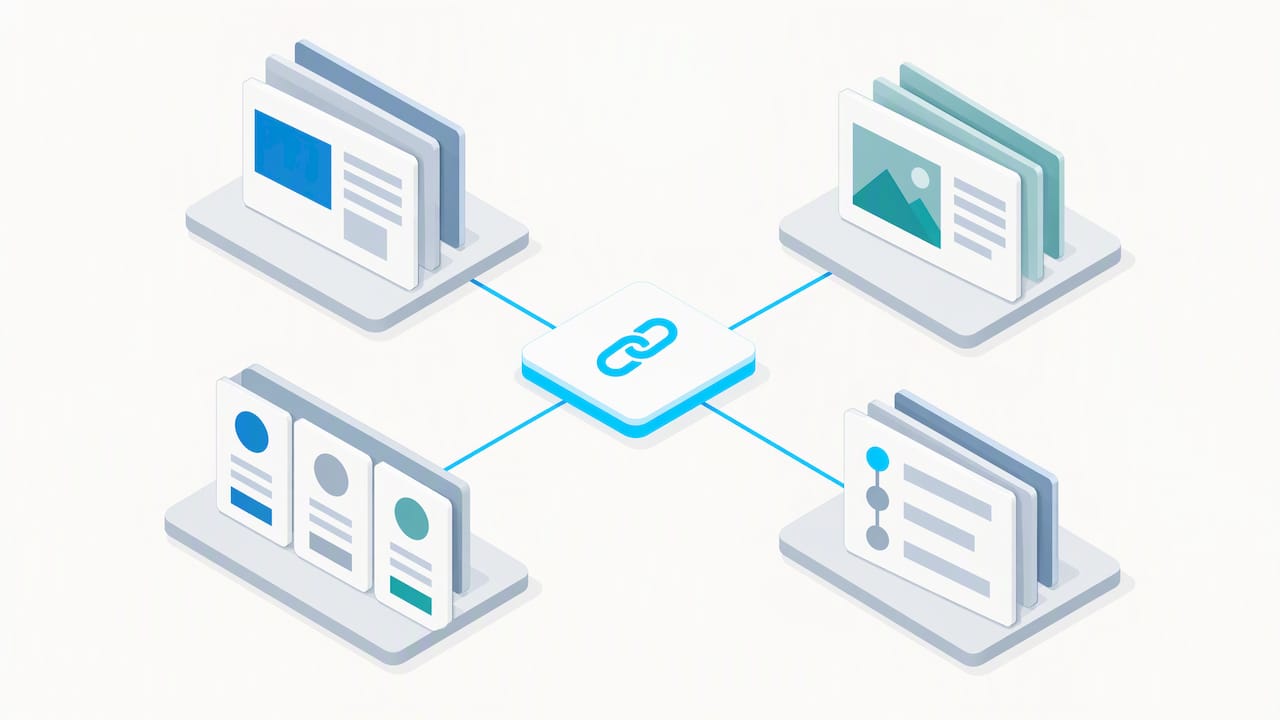
Interactive ROI calculators and personalized microsites round out this category. Both let a buyer self-serve an answer specific to their situation instead of extrapolating from a generic case study, which is often the difference between a prospect forwarding your material internally or letting it sit unread.
How to organize, tag, and distribute your collateral library
An asset nobody can find is an asset that does not exist. Most enablement failures are not production problems, they are retrieval problems: the deck exists, but the rep cannot locate the current version in under thirty seconds.
A workable taxonomy needs six fields on every asset:
- Persona: which buyer role the asset speaks to (economic buyer, technical evaluator, end user).
- Buyer stage: problem-aware, solution-aware, product-aware, or internal-facing.
- Use case: the specific scenario or objection the asset addresses.
- Format: deck, one-pager, video, case study, calculator, or script.
- Owner: the person accountable for keeping it current.
- Last reviewed: the date it was last checked for accuracy.
A simple folder structure mirrors this: top-level folders by buyer stage, subfolders by persona, and a consistent file-naming convention that includes the format and the review date. It sounds basic, but most libraries skip it and pay for that later in rep frustration and outdated pricing sheets circulating in the wild.
Ownership needs to be explicit, not assumed. Four roles cover it:
- Content owner: writes or commissions the asset and is accountable for its accuracy.
- Sales owner: a rep or sales leader who confirms the asset reflects what actually works in live deals.
- Approval gate: whoever signs off before an asset goes live, usually product marketing or enablement leadership.
- Feedback owner: the person who collects and routes rep feedback back into the next revision.
Distribution channel matters as much as the taxonomy. CRM records work well for deal-specific assets a rep attaches directly to an opportunity. Enablement platforms and content hubs are better for discovery, browsing, and search across the whole library. Digital sales rooms perform best for anything you want a buyer to engage with directly, since they combine delivery with engagement tracking in one link.
Pro Tip: Start your library with the twenty assets your reps use most often, tag them properly, and retire or merge everything else before adding anything new.
A short setup checklist gets a first version of this live fast: audit what exists, assign the six metadata fields to each asset, name an owner for every piece, pick one primary distribution channel per asset type, and set a date to review the whole structure again in ninety days.
How to audit and refresh collateral on a regular schedule
Collateral rot is quiet. Nobody notices a pricing one-pager is six months out of date until a prospect calls it out in a live deal. An audit process catches that before it costs you a deal.
Run the audit in four steps.
- Inventory everything. Export your full asset list from your content platform, or build a spreadsheet if you do not have one, and record the owner, last review date, and buyer stage for each item.
- Score each asset. Use a rubric with four attributes: accuracy (0 to 3), buyer relevance (0 to 3), usage over the last 90 days (0 to 3), and impact estimate (0 to 5). The Modern Enablement Benchmarks Report from SBI recommends scoring assets this way and flagging anything that totals 10 or higher as a priority refresh.
- Plot impact against effort. An asset with high impact and low effort to fix gets updated immediately. High impact, high effort gets scheduled. Low impact, either effort level, gets retired rather than refreshed.
- Validate with reps. Pull feedback directly from the people using the asset in live deals rather than relying only on download or view counts.
That scoring step matters because usage data alone can mislead you. An asset might get opened often simply because it is the only thing tagged for a given use case, not because it actually helps close deals. The SBI benchmarks note that small teams tend to staff fundamentals first, meaning content curation and onboarding, before building out dedicated analytics, so rep feedback often has to substitute for granular usage data in smaller organizations.
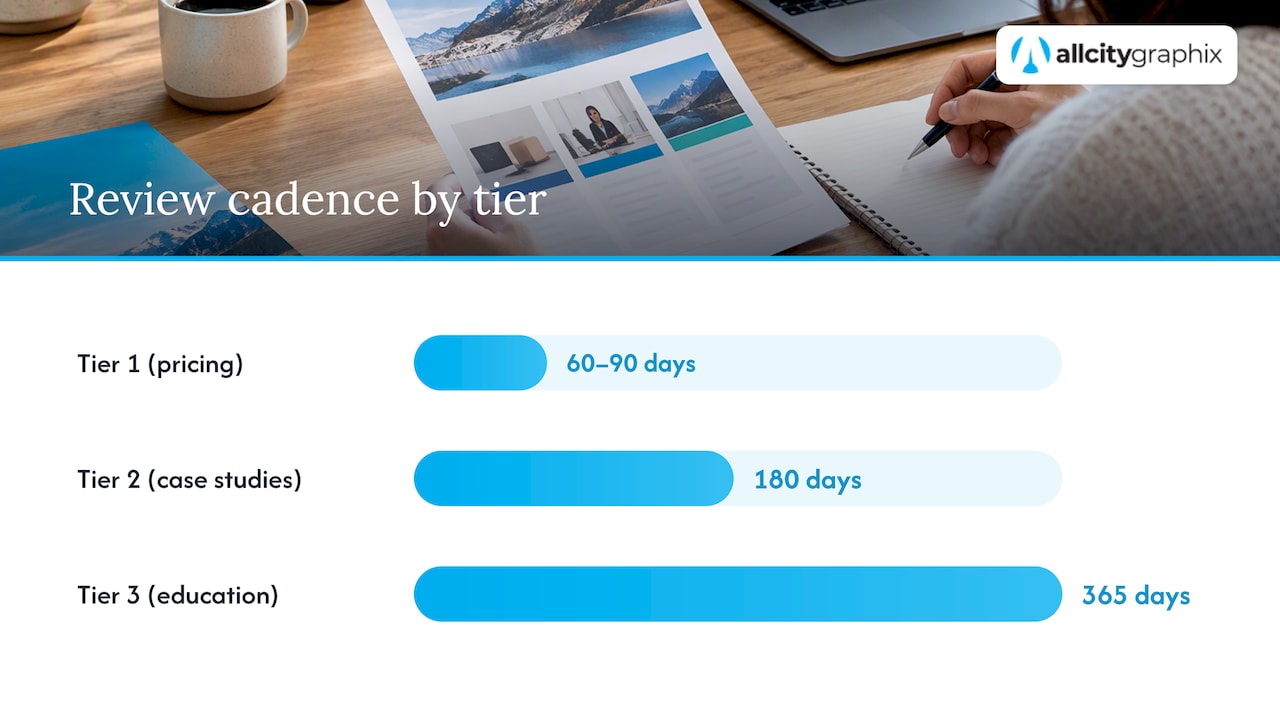
A tiered review cadence keeps this sustainable instead of becoming a quarterly fire drill:
- Tier 1 (pricing, battlecards, compliance language): review every 60 to 90 days.
- Tier 2 (case studies, ROI models): review every 180 days.
- Tier 3 (foundational education, problem-aware whitepapers): review annually.
This tiering exists because reviewing everything on the same schedule burns out an enablement team fast, and most of that effort gets spent on assets that rarely change anyway.
Measuring whether your collateral actually moves deals
Collateral that nobody tracks is collateral you are producing on faith. A handful of metrics tell you whether an asset is pulling its weight or just taking up space in the library.
Priority metrics worth tracking:
- Content utilization rate: the share of available assets reps actually use in live deals.
- Win rate: tracked by asset or asset combination, not just by rep or by quarter.
- Time-to-first-value: how quickly a new asset starts showing up in won deals.
- Ramp time: how long it takes a new rep to reach full productivity, which onboarding materials directly influence.
- Training completion rate: whether reps actually finish the enablement content assigned to them.
Teams using a formal enablement methodology are twice as likely to report increases in win rate and quota attainment, according to Highspot’s State of Sales Enablement Report. That gap is the clearest argument for treating measurement as a core part of the collateral program rather than an afterthought.
Instrumentation does not need to be complicated. UTM parameters and CRM tagging tell you which asset touched which deal. Content engagement tracking inside your enablement platform shows you time spent and which sections a buyer actually opened. Digital sales room analytics go further, showing you which stakeholder in a buying committee engaged with which section and when, which is useful for timing a follow-up call.
Several experiments are worth running before you assume any of this works the way you think it does, such as testing different versions of sales decks, comparing personalized digital sales rooms with standard packets, and tracking whether prospects who use an interactive ROI calculator convert differently than those who only receive a static ROI report.
Highspot’s benchmarking also found that consolidated enablement tech stacks produce 19 percentage points higher average quota attainment than fragmented ones, which is a strong argument for routing all of this instrumentation through as few platforms as possible.
A simple monthly dashboard covering utilization, win rate by asset, and ramp time for new hires gives stakeholders enough to see whether the program is working without drowning anyone in detail.
Why production quality still decides whether collateral gets used
A discovery-led process shapes how some creative agencies think about collateral, because the assets that perform best start with a clear picture of the buyer’s actual objections, not a generic template. That discovery work maps directly onto the stage-aligned catalog above: a battlecard built without talking to reps about what buyers actually push back on rarely survives contact with a real sales call.
Good collateral answers a buyer’s next question before they have to ask it.
Visual consistency matters more than most teams assume. A sales deck, a one-pager, and a case study that use three different layouts and color systems read as three different companies, and that inconsistency quietly undermines buyer confidence at the exact moment you need it most. Clear CTAs matter just as much: every asset should end with one obvious next step, not three competing ones.
Production work across branding and sales materials shows up in All City Graphix’s portfolio, where the throughline across projects is the same discovery-to-execution process described above.
Pro Tip: Design every sales asset with one primary call to action. An asset trying to do three jobs at once usually does none of them well.
What most teams get wrong about sales collateral
The conventional advice treats collateral as a production problem: make more decks, make them prettier, ship them faster. That misses the actual bottleneck, which is almost always organization and measurement, not volume. A library with 200 untagged, unreviewed assets performs worse than one with 30 that are current, owned, and easy to find.
The audit rubric and tiered cadence in this guide matter more than any single template, because collateral decays quietly. Nobody flags a stale pricing sheet until a prospect catches it mid-call, and by then the damage is done.
If you take one thing from this: stop producing new assets until you know which of your existing ones reps actually use. Usage and rep feedback, not a content calendar, should decide what gets built next. Digital sales rooms and personalized microsites are worth testing, but they amplify good collateral, they do not fix collateral that was never organized or validated in the first place.
— Alex
Getting your collateral built by a team that does this daily
Most sales teams do not have a spare designer on staff, which means decks, one-pagers, and case studies either get built in PowerPoint by whoever has time, or they do not get built at all. All City Graphix handles the production side directly: branding, sales decks, one-pagers, trade-show materials, and digital assets built around the discovery process described above, so what you hand your reps actually looks like it belongs to your company.

The most-requested deliverables we build for sales and enablement teams include:
- Sales decks and one-pagers aligned to a consistent brand system.
- Case study layouts that make results scannable in under a minute.
- Trade-show and event collateral, including booth graphics and leave-behinds.
- Digital assets for microsites, digital sales rooms, and online pricing guides.
If your collateral library needs a visual refresh or you are building one from scratch, our services page outlines current capabilities, and our graphic design services cover deck and one-pager production specifically. Schedule a discovery meeting to talk through what your team actually needs.
FAQ
What are some examples of sales collateral?
Common examples include sales decks, one-pagers, case studies, battlecards, ROI reports, pricing guides, and demo videos. The right example depends on buyer stage: problem-aware buyers respond to whitepapers and research reports, while product-aware buyers need case studies and pricing guides.
What are the five pillars of sales enablement?
Definitions vary across vendors and analysts, but a common version includes content management, training and coaching, sales process alignment, analytics and measurement, and technology or tools. The SBI benchmarks report notes that smaller teams often prioritize content and training first before building out the remaining pillars.
What is the 3-3-3 rule in sales?
The 3-3-3 rule is not a standardized enablement framework covered by the research behind this article, and definitions of it vary by source. Rather than relying on an unverified rule, focus on the stage-aligned collateral catalog and the review cadence outlined above, which are both grounded in published benchmarks.
What are the three pillars of sales enablement?
When reduced to three, most frameworks converge on content, training, and technology, the assets reps use, the coaching that teaches them to use it, and the systems that deliver and track it. The audit rubric and tiered review cadence in this guide apply across all three.
Sources
- State of Sales Enablement Report 2023 (Highspot community PDF)
- The 23 Types of Sales Collateral Every Team Needs (+ Examples) — Dock
- Modern Enablement Benchmarks Report — SBI
- Buyer enablement and digital sales rooms — Highspot
- Role-playing as a sales-training tool — Harvard Business Review