

BLUF: state and local governments must meet WCAG 2.1 Level AA under the DOJ’s Title II rule, on a compliance clock that started in 2024. Private businesses aren’t named in that specific rule, but courts and regulators overwhelmingly use WCAG as the benchmark when judging ADA compliance claims. That’s the entire legal landscape in two sentences. Everything else is detail.
If you run a government website, the deadline that matters is tied to your jurisdiction’s population, and the DOJ’s final rule spells it out. If you run a business website open to the public, you don’t have a named statutory deadline, but you’re not off the hook. Plaintiffs’ attorneys and the DOJ itself point to WCAG as the yardstick in Title III cases, and demand letters citing inaccessible sites have become common enough that treating this as optional is a bad bet.
Here’s what to do immediately, regardless of which category you fall into:
- Run a hybrid accessibility audit (automated scan plus manual testing) across your highest traffic pages and every unique template.
- Prioritize fixes that block entire user journeys: unlabeled forms, keyboard traps, missing alt text on functional images.
- Document everything you test and everything you fix. That paper trail matters more than people realize.
Key Takeaways
ADA website compliance means meeting WCAG 2.1 Level AA through hybrid automated and manual testing, backed by documentation that proves ongoing good-faith remediation.
| Point | Details |
|---|---|
| Know your entity type | Title II governs public entities with a hard WCAG 2.1 AA deadline; Title III businesses face enforcement risk without a fixed date. |
| Meet the technical standard | Build to WCAG 2.1 Level AA at minimum, and consider WCAG 2.2 for extra durability. |
| Test with a hybrid method | Combine automated scans with keyboard, screen reader, and mobile testing to catch what tools alone miss. |
| Fix the highest-impact barriers first | Alt text, keyboard access, form labels, and captions resolve the most common complaints fastest. |
| Get expert help when needed | Allcitygraphixny builds accessibility into web design and redesign projects rather than treating it as a bolt-on fix. |
Table of Contents
- Ada Website Compliance and the Legal Framework Behind It
- What WCAG Level AA Actually Requires From Your Site
- Compliance Deadlines for Public Entities and the Enforcement Reality for Everyone Else
- How to Test Your Site: A Hybrid Auditing Approach
- Fixing the Problems: A Remediation Checklist That Moves the Needle Fast
- Who’s Responsible When Third-Party Tools Break Accessibility
- Getting a Demand Letter or Complaint: Your First 30 Days
- Where to Find the Official Rules and Standards
- Accessibility Belongs in the Design, Not Bolted On Afterward
- What All City Graphix Does for ADA Compliance
- Sources
- FAQ
Ada Website Compliance and the Legal Framework Behind It
ADA website compliance splits along two tracks, and knowing which one applies to you changes almost everything about how you approach remediation.
Title II covers state and local government entities: city websites, public school portals, DMV login systems, county permit applications. In April 2024, the DOJ finalized a rule requiring these entities to meet WCAG 2.1 Level AA as a technical standard, not just a vague “reasonable accommodation” suggestion. That’s a meaningful shift. Before this rule, public entities operated in a gray zone where accessibility was expected but not technically defined. Now it is, in writing, with dates attached.
Title III covers businesses open to the public: retailers, restaurants, service providers, nonprofits, healthcare practices. Title III doesn’t currently carry a DOJ rule that names WCAG the way Title II does. Instead, enforcement runs through nondiscrimination claims, meaning a plaintiff argues your website denied them equal access to goods or services. Courts deciding these cases routinely look to WCAG for a working definition of “accessible,” even without a formal regulatory mandate. The DOJ’s own guidance on web accessibility confirms this practice, describing common barriers like missing alt text, poor color contrast, and keyboard traps as the kinds of problems that trigger Title III complaints.
The practical takeaway is simple: figure out which entity type you are, then treat WCAG 2.1 Level AA as your target regardless of which title technically governs you. A city government has a hard deadline. A private business has a target painted on its back by class-action law firms that specialize in exactly this kind of litigation. Neither situation rewards waiting.
One nuance worth flagging: some organizations sit in both categories. A public university, for instance, runs a .edu domain that’s clearly Title II, but might also operate a for-profit bookstore or event venue with separate Title III exposure. Map your entity’s full digital footprint before assuming one rule applies cleanly.
What WCAG Level AA Actually Requires From Your Site
WCAG organizes accessibility around four principles, often shortened to POUR: content must be Perceivable, Operable, Understandable, and Robust. That framework sounds abstract until you translate it into the checks a developer actually runs.
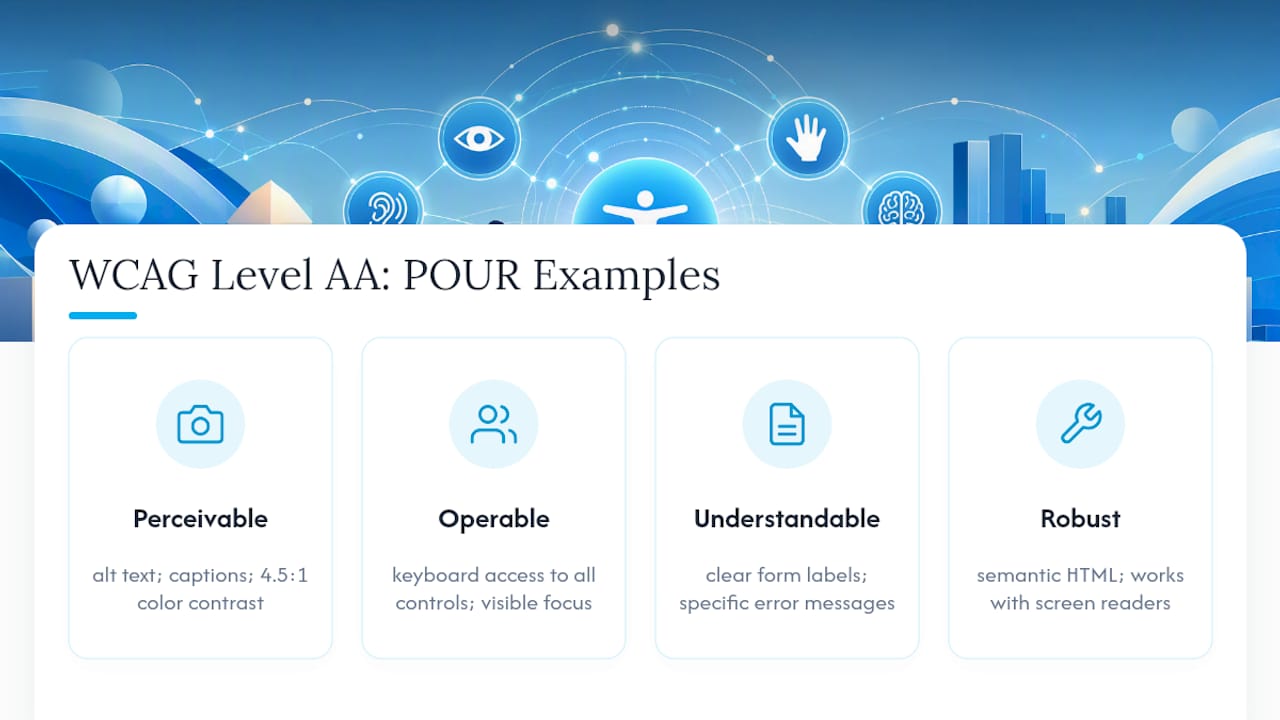
Perceivable means users need to be able to sense your content somehow, whether that’s sight, hearing, or touch through assistive technology. In practice: images need meaningful alt text, videos need captions, and text needs enough color contrast to read against its background (WCAG’s minimum ratio is 4.5:1 for normal text).
Operable means every function works without a mouse. Keyboard-only users need to reach every link, button, and form field in a logical order, with a visible focus indicator showing where they are. Understandable means your forms label their fields clearly and your error messages tell people what actually went wrong, not just that something did. Robust means your code works cleanly with assistive technology like screen readers, which usually comes down to using proper semantic HTML instead of div soup.
Here’s the part that trips people up: automated scanners catch maybe a third of these issues reliably. According to WebAIM’s accessibility guidance, automated tools are valuable for surfacing obvious code errors but incomplete on their own. A scanner can tell you an image lacks an alt attribute. It cannot tell you whether the alt text you wrote actually describes what’s in the image, or whether your custom dropdown menu behaves sensibly when a screen reader user tabs through it. That gap is why every credible testing methodology combines automated and manual review.
On the version question: the DOJ’s Title II rule specifically cites WCAG 2.1 Level AA, even though W3C has since published WCAG 2.2 with additional success criteria. If you’re a public entity, meeting 2.1 satisfies the letter of the rule, but building to 2.2 costs little extra and future-proofs your compliance posture as standards keep advancing.
Compliance Deadlines for Public Entities and the Enforcement Reality for Everyone Else
The DOJ’s rule set staggered deadlines based on jurisdiction population, giving larger governments less runway on the theory that they have more resources.
- Public entities serving larger populations must comply by a specified deadline in 2027.
- Smaller public entities and special district governments have a later compliance deadline in 2028.
- These dates come directly from the Federal Register notice publishing the final rule, and the DOJ has also issued a Small Entity Compliance Guide acknowledging that smaller governments need tailored, resource-conscious steps to get there.
Compliance isn’t a one-time finish line. Once you hit your deadline, WCAG conformance needs to hold up across every new page, every redesign, and every third-party tool you bolt onto the site afterward. A government portal that passes an audit in March and adds a non-accessible payment widget in June is back out of compliance the day that widget goes live.
Private businesses don’t have an equivalent countdown clock, and that fact leads some owners to deprioritize accessibility entirely. That’s a mistake. Title III enforcement runs through DOJ investigations and private lawsuits, and the volume of ADA web accessibility litigation targeting businesses has grown steadily for years. No statutory deadline doesn’t mean no risk. It just means the risk shows up unpredictably, usually in the form of a demand letter, instead of on a published schedule.
How to Test Your Site: A Hybrid Auditing Approach
Testing methodology determines whether your compliance effort is real or cosmetic. A one-and-done automated scan gives you a false sense of security. Here’s the sequence that actually surfaces the problems that matter:
- Run automated scans across every unique template, not just your homepage. Tools that crawl your site for missing alt attributes, contrast failures, and malformed HTML structure will flag a meaningful chunk of issues fast and cheap. Cover your highest traffic pages first.
- Do a keyboard-only walkthrough. Unplug your mouse. Tab through every page. Can you reach every link, open every menu, submit every form, and always see where focus currently sits?
- Run a screen reader pass using tools like NVDA or VoiceOver on your key user journeys: checkout, contact forms, account login. This is where you catch the issues automated tools miss entirely, like a screen reader announcing “button” with no indication of what the button does.
- Check mobile separately. Touch targets, zoom behavior, and orientation locks create accessibility problems that don’t exist on desktop.
- If possible, involve actual users with disabilities in testing. Their feedback surfaces friction points that no internal team, however careful, reliably catches on their own.
As the ADA’s own guidance notes, automated checkers commonly underreport problems like incorrect alt text context and the real-world usability of complex form controls, which is exactly why manual and assistive-technology testing aren’t optional add-ons.
Pro Tip: Keep timestamped screenshots, scan reports, and remediation tickets for every issue you find and fix. If a complaint ever lands on your desk, that evidence trail is often the difference between a quick resolution and prolonged legal exposure.
Sample your site rather than trying to test every single page if you’re running a large site. Test every unique template and page type once, then spot-check a representative sample of content pages within each type.
Fixing the Problems: A Remediation Checklist That Moves the Needle Fast
Not every accessibility fix carries equal weight. Some changes eliminate major barriers in an afternoon. Others take a redesign. Work in this order:
- Write meaningful alt text for every functional and informational image. Decorative images get empty alt attributes (
alt="") so screen readers skip them entirely. - Fix keyboard navigation and focus order. Every interactive element needs a visible focus outline, and tabbing through the page should follow a logical, predictable path.
- Label every form field explicitly. A placeholder is not a label. Screen reader users need a programmatically associated label they can hear before they type.
- Add skip links so keyboard users can jump past repetitive navigation straight to main content.
- Add captions and transcripts to video and audio content, and audio descriptions where visual information isn’t conveyed in the dialogue.
- Fix your heading hierarchy. One H1 per page, logically nested H2s and H3s underneath, no skipping levels just because a smaller heading looked better visually.
- Check color contrast against WCAG’s minimums and never rely on color alone to convey meaning (a red asterisk on a form field needs a text label too, not just red ink).
- Retest after every fix. Remediation that isn’t verified is just a hope, not a compliance record.
Pro Tip: Prefer native HTML elements over custom-built widgets wherever you can. A native <button> comes with keyboard support and screen reader compatibility built in; a <div> styled to look like a button needs ARIA attributes bolted on to behave the same way, and that fallback approach is easy to get wrong. W3C’s conformance guidance makes the same point: use semantic HTML first, treat ARIA as a supplement, not a substitute.
Who’s Responsible When Third-Party Tools Break Accessibility
Your site probably isn’t built entirely from your own code. Chat widgets, booking systems, payment processors, and embedded video players all bring their own accessibility baggage, and that baggage becomes your legal problem the moment it’s live on your domain.
The DOJ’s own guidance on Title II implementation makes clear that organizations remain responsible for barriers created by third-party content they integrate, even when they didn’t write the underlying code. An inaccessible booking widget from a vendor is still your barrier in the eyes of a regulator or a plaintiff.
Protect yourself at the procurement stage, before a contract gets signed:
- Ask vendors for a current accessibility conformance report (a VPAT is the standard document) and read it, don’t just file it.
- Build accessibility warranties and remediation service-level agreements into the contract itself.
- Request references from other clients who’ve specifically tested the vendor’s accessibility claims.
- Retest every third-party component after it’s integrated into your live site, since accessibility can behave differently once combined with your CSS and JavaScript.
Contractual protection is one of the most effective long-term defenses against third-party accessibility risk, precisely because it puts remediation costs back on the vendor instead of leaving you to absorb them alone.
Getting a Demand Letter or Complaint: Your First 30 Days
A demand letter or formal complaint about your website’s accessibility triggers a clock, and how you respond in the first month shapes everything that follows.
- Acknowledge receipt promptly and loop in legal counsel before drafting any substantive response.
- Preserve everything: server logs, prior accessibility test results, development tickets, vendor communications. Don’t delete or “clean up” anything related to the site in question.
- Run an immediate audit focused specifically on the barriers named in the complaint, then expand outward to catch related issues on the same templates.
- Fix the highest-impact barriers first and keep a written remediation timeline you can show, not just tell.
- Consider a temporary accessible alternative (a staffed phone line, an accessible PDF version of critical content) only as a bridge while permanent fixes are underway, never as a long-term substitute.
- Document every remediation step with timestamps. Retaining these audit trails as evidence of good-faith effort is often what resolves a complaint without it turning into prolonged litigation.
Silence or defensiveness rarely helps here. A documented, fast-moving remediation response usually does.
Where to Find the Official Rules and Standards
Everything in this article traces back to a small set of primary sources, and bookmarking them saves you from relying on secondhand interpretations later.
- Ada lays out the WCAG 2.1 AA requirement and compliance dates in plain language.
- The Federal Register notice contains the actual legal text of the final rule, useful when you need the precise regulatory language.
- W3C’s WCAG overview documents the full set of success criteria and conformance levels.
- The DOJ’s general web accessibility guidance covers Title II and Title III applicability with real-world barrier examples.
- WebAIM’s WCAG 2 checklist translates the technical standard into a practical testing reference developers actually use day to day.
Accessibility Belongs in the Design, Not Bolted On Afterward
Most agencies treat accessibility as a compliance patch applied after a site is built. That approach almost always shows: retrofitted alt text that describes nothing useful, focus states added as an afterthought, contrast fixes that clash with the original palette. Allcitygraphixny builds accessibility into the design process itself, the same way brand strategy and user experience get built in from the discovery meeting forward, not tacked on before launch.
After 15 years designing web experiences for small businesses and established companies alike, the pattern is consistent: sites designed with accessibility as a core requirement tend to have cleaner semantic structure, faster load times, and better search visibility as a side effect, not a coincidence. Good heading hierarchy helps a screen reader user and a search crawler for the same underlying reason.
— Alex
What All City Graphix Does for ADA Compliance
Fixing accessibility issues after they’ve already drawn a complaint costs more, in both time and legal exposure, than building it in from the start. Allcitygraphixny approaches ADA website compliance as part of the core services it provides: accessibility audits that combine automated scanning with manual and assistive-technology testing, remediation sprints prioritized by risk and impact, and accessible-by-design rebuilds for sites that need more than patchwork fixes.

A typical engagement starts with an audit report identifying specific WCAG failures on your site, followed by a prioritized remediation plan, then verification testing once fixes are live. If your current site is old enough that patching it feels like more work than starting fresh, that’s worth weighing against the case for a redesign instead of incremental fixes. Reach out through Allcitygraphixny to request an accessibility audit and get a clear picture of where your site stands before a demand letter forces the issue.
Sources
- Fact Sheet: New Rule on the Accessibility of Web Content and Mobile Apps Provided by State and Local Governments
- Guidance on Web Accessibility and the ADA
- Nondiscrimination on the Basis of Disability; Accessibility of Web Information and Services of State and Local Government Entities (Federal Register)
- WebAIM: WebAIM’s WCAG 2 Checklist
FAQ
What Is ADA Website Compliance?
ADA website compliance means a site meets accessibility standards, most commonly WCAG 2.1 Level AA, so people with disabilities can perceive, navigate, and interact with it using assistive technology.
Is WCAG 2.1 AA Legally Required for All Websites?
It’s legally required for state and local government entities under the DOJ’s Title II rule; private businesses don’t have a named WCAG mandate but face Title III enforcement risk where WCAG is used as the practical benchmark.
What Are the ADA Compliance Deadlines for Government Websites?
Public entities serving larger populations must comply by a specified deadline in 2027, and smaller public entities have a later compliance deadline in 2028, per the DOJ’s Federal Register rule.
Can Automated Tools Alone Confirm ADA Compliance?
No. Automated scanners catch obvious code errors but miss context-dependent issues, so a credible testing approach pairs automated scans with manual and screen reader testing.
Am I Responsible for Accessibility Issues in Third-Party Widgets?
Yes. Site owners remain responsible for barriers created by embedded or integrated third-party tools, which is why vendor contracts should include accessibility warranties before integration.
How Can Allcitygraphixny Help With ADA Compliance?
Allcitygraphixny offers accessibility audits, prioritized remediation, and accessible-by-design web builds, integrating WCAG standards into the design process instead of treating them as an afterthought.