

A website content strategy is a documented plan that connects every page you publish to a specific business goal and a specific audience need, then defines how that content gets created, governed, measured, and eventually retired. It is not a blog schedule and it is not a pile of SEO keywords stuffed into paragraphs. It is the reasoning behind why a page exists at all.
If you need to start today, here is the three-step version:
- Set one primary goal. Pick the single business outcome your site needs most right now, more leads, more bookings, or better brand credibility, and write it down in one sentence.
- Run a 15-minute inventory. Open a spreadsheet, list every page on your site, and mark which ones actually serve that goal.
- Sketch a 30/60/90 plan. Day 30: fix the three weakest pages tied to your goal. Day 60: publish two new pages that close obvious gaps. Day 90: measure and adjust.
A five-person B2B consulting firm might set “generate 15 qualified demo requests per month” as its primary goal, discover during the inventory that its services page hasn’t been touched in three years and ranks nowhere, and use the 30/60/90 window to rewrite that page, publish two case studies, and build a simple lead-tracking dashboard. That is a working content strategy, built in an afternoon and refined over a quarter.
Key Takeaways
A website content strategy works when every page ties to a measurable business goal, gets built through a defined lifecycle, and gets reviewed on a schedule instead of forgotten after launch.
| Point | Details |
|---|---|
| Start with one goal | Write a single measurable business goal before creating or auditing any page. |
| Audit before you create | Inventory and score existing pages using an impact times effort matrix before writing anything new. |
| Build the full lifecycle | Plan, create, maintain, and unpublish content deliberately instead of only focusing on production. |
| Write for information gain | Prioritize original data and clear entity relationships over repeating what competitors already say. |
| Get expert help when needed | Allcitygraphixny handles discovery through launch and ongoing maintenance for teams that need speed or skill they don’t have in-house. |
Table of Contents
- What Is a Website Content Strategy, Really?
- The Four Phases Every Content Strategy Runs Through
- How to Plan Content That Actually Serves Business Goals
- Auditing What You Already Have
- Producing Pages That Work for Readers and Search Engines
- Setting Up Governance So Content Doesn’t Fall Apart
- Launching with a Checklist and Measuring What Matters
- Keeping Content Fresh Instead of Letting It Rot
- Choosing the Right Tools Without Overbuying
- Templates You Can Copy Today
- Making Content Feel Personal Without a Massive Budget
- Getting Your Content in Front of People Beyond Your Website
- Watching What Competitors Publish (and Doing It Better)
- Why User Experience Decisions Shape Content Just as Much as Words Do
- Budgeting for Content Without Guessing
- When to Bring in an Agency vs. Keep It In-House
- How Allcitygraphixny Handles Website Content Strategy for You
- Sources
What Is a Website Content Strategy, Really?
A website content strategy defines why content exists and what it needs to accomplish; content tactics define how and when you execute against that plan. Confuse the two and you end up with a publishing calendar that looks busy but doesn’t move any business metric. According to Trav Brand’s framework, a real content strategy has to define purpose, audience, substance, structure, workflow, and governance before a single word gets written.
Here’s the distinction in practice:
| Dimension | Strategy | Tactics |
|---|---|---|
| Question answered | Why does this content exist? | How and when do we produce it? |
| Time horizon | Quarters to years | Days to weeks |
| Example | “Own the buyer’s research phase for mid-market manufacturers” | “Publish a weekly LinkedIn post” |
| Owner | Leadership or content lead | Writer, designer, or social manager |
| Changes when… | Business goals shift | Trends, algorithms, or bandwidth shift |
A useful way to picture it: your evergreen pillar page on “how to choose a commercial contractor” is strategy in action, built to answer a buyer’s core research question for years. Your weekly social post teasing that page is a tactic. If you swap out the tactic, the strategy survives. If you swap out the strategy, every tactic underneath it becomes pointless.
Quick self-check before you plan anything else:
- Can you state your content’s purpose in one sentence without using the word “engagement”?
- Does every page map to a stage in your buyer’s decision process?
- Would a stranger reading your homepage know who it’s for within five seconds?
The Four Phases Every Content Strategy Runs Through
Content strategy website work moves through four distinct phases, and skipping one is the most common reason programs stall out after six months.
- Planning. You define goals, research the audience, and map content types to funnel stages. Success looks like a documented plan, not a vague sense of direction. According to Incremys’s 2026 framework, this stage should include preparatory analysis before any writing begins, competitive gaps, keyword intent, and internal stakeholder input all get captured up front.
- Creation. Writers, designers, and subject-matter reviewers produce the actual pages, following templates and voice guidelines set during planning. Success looks like consistent quality across contributors, not one brilliant page surrounded by mediocre ones.
- Maintenance. Content gets reviewed on a set cadence, updated when signals demand it, and monitored against its original KPIs. Success looks like a site where nothing is more than 12 to 18 months stale.
- Unpublishing or archiving. Underperforming, outdated, or redundant pages get retired deliberately, either deleted with a redirect or archived with a clear note. Success looks like a lean site, not a graveyard of abandoned landing pages.
Trace one page through the full cycle: a home improvement contractor drafts a brief for “kitchen remodel cost guide” during planning, a writer and photographer produce it during creation, it gets reviewed every six months and updated with new pricing during maintenance, and three years later, once the company shifts to bath remodels only, it gets archived with a redirect to the new core service page. That’s the whole lifecycle, and most sites only ever manage the first two steps.
How to Plan Content That Actually Serves Business Goals
Planning starts with a goal you can measure, not a vibe you’re chasing. A SMART goal for content might read: “Increase organic demo requests from the services section within a realistic timeframe, measured through form submissions tagged by source page.” That single sentence tells your writer what to write, your designer what to build, and your analyst what to track.
Stakeholders need clear lanes before work starts, or everyone ends up editing everyone else’s copy in circles:
- Business owner or department lead sets the goal and approves final direction.
- Content owner or marketing manager runs the calendar and coordinates contributors.
- Writer or copywriter drafts pages against the brief and voice guide.
- Subject-matter reviewer checks technical or industry accuracy.
- Publisher handles the CMS, metadata, and go-live checklist.
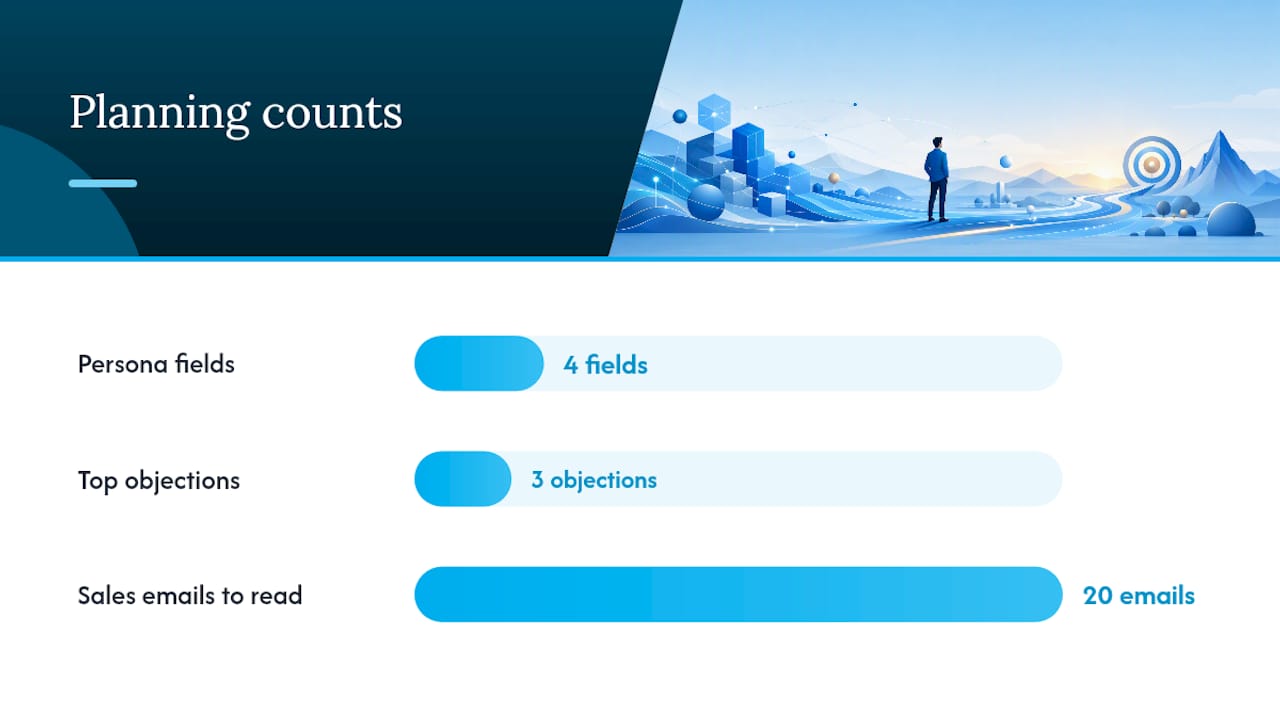
Persona work doesn’t need to be elaborate to be useful. Capture four fields per persona: their job-to-be-done, the exact phrases they search, their top three objections, and where they typically enter your funnel. A persona for a startup founder shopping for branding services might search “logo design for tech startup,” object on price and turnaround time, and enter through a Google search rather than referral.
For fast, cheap audience research, mine what you already have: sales call transcripts, support ticket themes, and the actual search queries in your Google Search Console data all reveal what people really want to know, often more accurately than a formal survey.
Pro Tip: Read your last 20 sales emails or support tickets before writing a single persona field. The objections and phrasing your prospects actually use will outperform anything you guess at a whiteboard.
Auditing What You Already Have
A content audit and gap analysis lets you inventory what you have, score it for quality and relevance, then prioritize updates versus new pages using an impact times effort matrix.
Your inventory spreadsheet needs these columns at minimum:
| Column | What to capture |
|---|---|
| URL | The live page address |
| Page type | Homepage, service page, blog post, FAQ, landing page |
| Owner | Who is responsible for updates |
| Publish date | Original go-live date |
| Last updated | Most recent substantive edit |
| Organic traffic (last 90 days) | Pulled from analytics |
| Conversions | Form fills, calls, or purchases attributed to the page |
Score each page against four criteria: is the information still accurate, is it still relevant to a current business goal, does it align with your priority personas, and is it technically healthy from an SEO standpoint (working links, proper headings, reasonable load speed). A page that fails two or more of those checks belongs in your rewrite queue, not your “leave it alone” pile.
Gap analysis is simpler than it sounds: list the questions your best customers ask before buying, then check whether a page on your site actually answers each one. If a manufacturing company gets asked “what’s your typical lead time” in every sales call but has no page addressing it, that’s a gap, and it’s usually a cheap one to close because you already have the answer sitting in a sales deck somewhere.
Prioritize the resulting list with a basic impact times effort matrix: high impact and low effort gets done this month, high impact and high effort gets scheduled next quarter, and low impact work gets cut regardless of how easy it is.
Producing Pages That Work for Readers and Search Engines
Every page type needs a template, or your writers will reinvent the structure every single time and your site will feel inconsistent to visitors. A homepage template typically needs a hero statement, a proof section, a services overview, and a primary call to action. A service page needs the problem it solves, how the process works, pricing signals if you offer them, and testimonials or portfolio proof. A blog post needs a clear takeaway in the first 100 words, subheadings that map to real questions, and one supporting example per claim. An FAQ page needs actual questions customers ask, not manufactured ones designed to stuff keywords.
For voice and tone, front-load the benefit in every paragraph’s first sentence, cut jargon your customer wouldn’t use in conversation, and stick to one idea per paragraph so nothing gets lost in a wall of text.
On the SEO side, the rules have shifted. In 2026, search engines and AI systems reward information gain and semantic clarity, meaning your content needs to add something genuinely new (a data point, a named process, a specific example) rather than repeating what the top ten results already say. Build your semantic checklist around these questions before publishing:
- Does this page mention the specific entities (tools, standards, named processes) a knowledgeable person would expect?
- Does it link internally to related pages so the topic’s full context is clear?
- Would an AI summarizer find one fact here it couldn’t find on a competitor’s page?
Accessibility deserves the same rigor as SEO, not an afterthought pass at the end. Check that every image has meaningful alt text, headings follow a logical hierarchy without skipping levels, and your language stays at a reading level your actual audience can parse quickly, a standard University of Minnesota’s accessibility guidance treats as a baseline requirement, not a nice extra.
Pro Tip: Read your homepage hero section out loud to someone outside your industry. If they can’t tell you what you do and who it’s for within ten seconds, rewrite it before you touch anything else on the page.
Setting Up Governance So Content Doesn’t Fall Apart
Governance sounds bureaucratic until you’ve watched a site drift into chaos without it, three people editing the same page with three different opinions on tone, and nobody sure who has final say.
Four roles cover most organizations, even small ones where one person wears two hats:
- Owner decides what gets prioritized and defends the budget.
- Editor enforces voice, structure, and quality standards across every page.
- Subject-matter reviewer checks technical or regulatory accuracy before anything goes live.
- Publisher handles the CMS mechanics: metadata, scheduling, and the final go-live check.
A lean signoff workflow might run like this: writer submits a draft, editor reviews for voice and clarity within two business days, subject-matter reviewer checks accuracy within one business day, and the publisher pushes it live once both approvals are logged. That’s four steps and rarely more than a week, which beats the six-week approval chains that kill momentum at larger companies.
Your editorial calendar needs these fields to function as a real planning tool rather than a wish list:
- Working title and target keyword or search intent
- Content type and funnel stage (awareness, consideration, decision)
- Assigned owner and deadline
- Priority score from your impact times effort matrix
- Status (briefed, drafted, in review, published, archived)
Prioritize by funnel stage balance first, then by impact score, since a calendar stacked entirely with awareness content while your decision-stage pages sit empty will generate traffic that never converts.
Launching with a Checklist and Measuring What Matters
Nothing goes live without a launch checklist, because the small stuff (a broken form, a missing meta description, a page excluded from your sitemap) is what quietly tanks performance for months before anyone notices.
Run through this before any page goes public: quality-assurance pass on every link and form, metadata written and previewed, analytics tagging confirmed in your tracking platform, and the page confirmed present in your sitemap and not blocked by robots.txt.
Your KPIs should map directly to the goal each page serves, not to a generic “traffic good, no traffic bad” mindset:
| Business goal | Primary KPI | What to track |
|---|---|---|
| Awareness | Organic traffic and reach | Sessions, new users, impressions |
| Acquisition | Lead volume | Form fills, calls, email signups |
| Revenue | Conversion rate | Sales-qualified leads, closed deals attributed to the page |
A basic dashboard should show organic sessions by page, conversion rate by page, and bounce rate on your top ten pages by traffic, reviewed monthly at minimum. For testing cadence, run one A/B test per quarter on a high-traffic page rather than five simultaneous tests across the site, since simultaneous tests on different pages are manageable, but testing multiple variables on the same page at once makes it impossible to know what actually moved the needle. Headline swaps and microcopy changes on your call-to-action buttons tend to produce the fastest readable results.
Keeping Content Fresh Instead of Letting It Rot
Content strategy website programs fail most often at maintenance, not creation, because writing something new feels productive while updating something old feels like a chore. Editorial governance requires explicit maintenance plans: scheduled reviews, assigned owners, and a clear lifecycle process for updating, repurposing, archiving, or unpublishing.
Set review cadence by page priority rather than reviewing everything on the same schedule, with more frequent reviews for higher-priority pages and less frequent for low priority ones.
Watch for these signals that a page needs attention sooner than its scheduled review: a sudden traffic drop of 20% or more, a ranking slide out of the first page for its target term, or a product or pricing update that makes the existing copy inaccurate.
When a page has run its course, archive rather than delete unless there’s a legal reason to remove it entirely, redirect the URL to its closest living replacement, and note internally why it was retired so nobody accidentally recreates it in six months. Before archiving, check whether the content can be repurposed instead, an old blog post might become the foundation for a new FAQ answer, or a discontinued service page’s testimonials might move to your portfolio.
Choosing the Right Tools Without Overbuying
Five tool categories cover a functioning content operation: a content management system for publishing, an editorial calendar tool for planning, SEO research software for keyword and gap analysis, analytics for measurement, and a testing platform for experimentation.
Selection criteria matter more than brand names: does the CMS let non-technical staff publish without a developer, does the calendar tool integrate with where your team already works, and does the analytics platform tie conversions back to specific pages rather than just showing traffic totals. In the U.S. market, common examples include WordPress and Shopify for CMS platforms (the two Allcitygraphixny builds on for client sites), Google Analytics for measurement, and any project management tool your team already uses for calendar coordination. These are examples of the category, not universal recommendations.
If you’re migrating platforms, pilot it small before committing the whole site. Pick one representative page type to migrate first, freeze new content on the old platform during the test window so nothing gets lost in the shuffle, and document a rollback plan in case the new platform reveals a dealbreaker you didn’t anticipate during evaluation.
Templates You Can Copy Today
A content brief needs these fields filled before a writer starts: working title, target keyword or intent, target persona, three key points to cover, internal links to include, and word count range. A filled example: “Title: Commercial Roof Repair Cost Guide. Intent: buyers comparing repair vs. replacement. Persona: facility manager, budget-conscious, needs approval from ownership. Key points: typical cost ranges, signs you need repair vs. replacement, how to get an accurate quote.”
An editorial calendar row in practice looks like: Title, “Commercial Roof Repair Cost Guide”; Intent, decision stage; Target keyword, “commercial roof repair cost”; Owner, marketing lead; Publish date, March 15; CTA, “Request a Free Roof Inspection.”
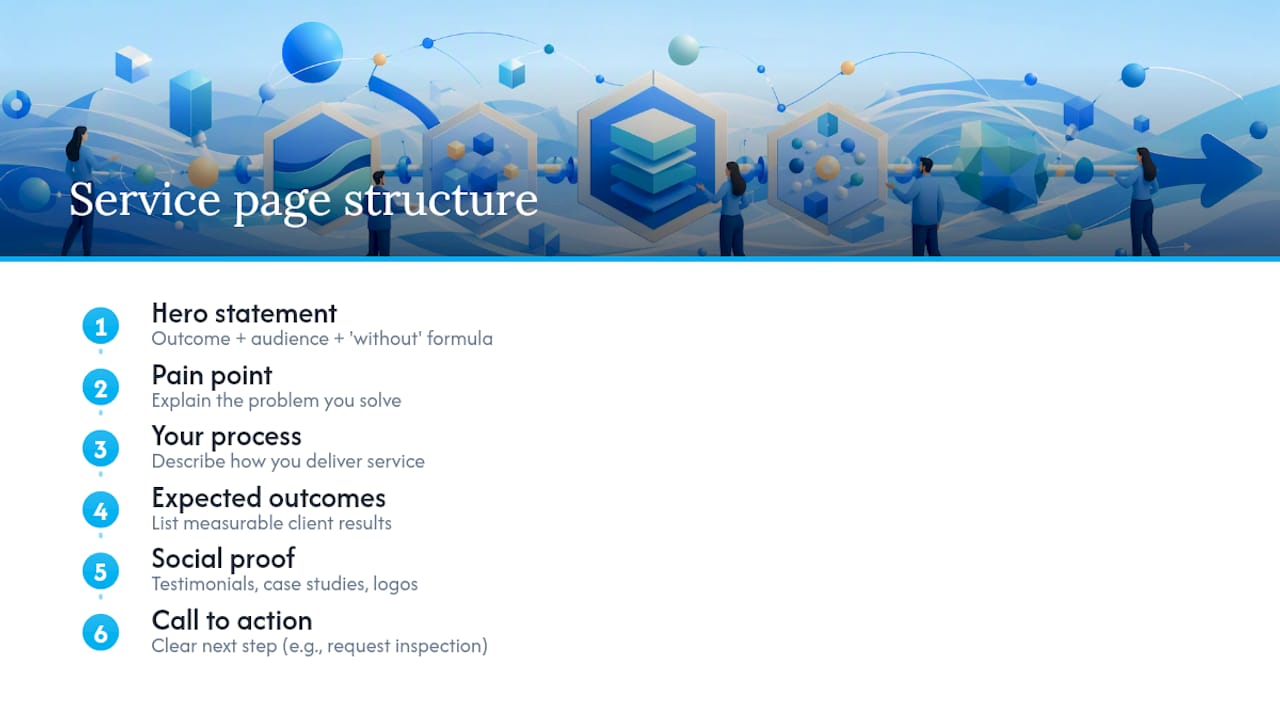
For a filled service page template, structure follows a proven persuasion sequence: open with a hero statement naming the outcome, the audience, and what they get to skip (the “outcome plus audience plus without” formula performs consistently well, according to Peter Avey’s conversion framework), follow with the pain point your service solves, then your process, expected outcomes, social proof, and a clear call to action. A hero line built on that formula might read: “Get a website that converts, without waiting six months for an agency to deliver it.”
For your first 30/90-day rollout: in the first 30 days, fix your three weakest high-traffic pages using this template structure. By day 90, publish two to three net-new pages that close the gaps your audit revealed, and run your first full measurement review against the KPIs you set in planning.
Making Content Feel Personal Without a Massive Budget
Personalization doesn’t require a six-figure martech stack. Segment your audience by the handful of variables that actually predict different needs, industry, company size, or where they are in the buying process, and adjust your calls to action and examples accordingly rather than rewriting entire pages for each segment.
A simple version: if you serve both startups and established companies, your homepage might show different case study examples or different CTA language based on a visitor’s referral source or the page they landed on. A returning visitor who’s already read your services page might see a “Ready to talk?” prompt instead of a generic “Learn more” button. Targeting gets more sophisticated as your traffic grows, dynamic content blocks, behavior-triggered emails, retargeted ads pointing back to specific pages, but the underlying principle stays the same: match the message to what you actually know about the visitor’s intent.
Getting Your Content in Front of People Beyond Your Website
A website content strategy that lives only on your website leaves reach on the table. Treat your core pages as the source material, then adapt pieces of them for email, social platforms, and any partner or industry publications relevant to your field.
A single pillar page on, say, “how to choose a branding agency” can spawn a LinkedIn post highlighting one insight, an email newsletter segment summarizing the key takeaway, and a shorter version pitched to an industry blog as a guest contribution. The distribution channel dictates the format, but the underlying research and positioning stay consistent, which is efficient and keeps your messaging coherent across every touchpoint a prospect might encounter you.
Prioritize channels based on where your actual buyers spend time rather than chasing every platform simultaneously. A B2B services firm targeting facility managers will get more from LinkedIn and industry newsletters than from Instagram, while a retail brand selling direct to consumers will see the opposite pattern.
Watching What Competitors Publish (and Doing It Better)
Competitive analysis isn’t about copying what other sites do, it’s about finding the gaps they’ve left open. Pull up your top three to five competitors’ sites and note which questions their content answers well, which topics they’ve ignored entirely, and where their pages feel thin or outdated.
The most useful competitive signal isn’t keyword overlap, it’s specificity gap. If every competitor’s service page says “we deliver quality results” without a single concrete number, process detail, or named example, that’s your opening to publish something with actual substance and win the comparison on depth alone. Check publish dates too: a competitor with a five-year-old blog post ranking for a valuable term is vulnerable to a fresher, more thorough page built around the same intent.
Why User Experience Decisions Shape Content Just as Much as Words Do
Content strategy and UX are not separate disciplines, they’re the same job viewed from different angles. A brilliantly written page buried under three menu clicks or loaded with a ten-second delay will underperform a mediocre page that loads instantly and sits one click from the homepage.
Page structure decisions belong to content strategy as much as design: where a call to action sits on the page, how much text appears before the fold, and whether your navigation reflects how customers actually think about your offerings rather than how your org chart is structured internally. Mobile experience deserves particular attention since most B2B and local service searches now happen on a phone, meaning your hero statement and primary CTA need to work at a glance on a five-inch screen, not just a 27-inch monitor.
Budgeting for Content Without Guessing
Resource allocation for content work usually splits across three buckets: strategy and planning time, production (writing, design, photography), and ongoing maintenance. Most organizations underfund the third bucket entirely, pouring everything into new page creation while letting existing pages decay untouched for years.
A workable allocation model reserves the bulk of hands-on effort for your highest-value pages, the ones driving revenue directly, while using more scaled, efficient production methods for lower-stakes supporting content. Incremys’s research suggests roughly 20 to 30% of effort on strategic, high-value pages like your homepage and core service pages, with the remaining 70 to 80% going toward broader, scaled content like local pages or long-tail blog posts where personalized automation can reasonably handle volume.
Whether you handle production in-house or bring in outside help, budget for revision cycles up front rather than treating them as scope creep. A first draft rarely converts as well as a second pass that’s been tested against real user behavior for a month.
When to Bring in an Agency vs. Keep It In-House
Keep content in-house when you have the writing skill, the design capacity, and enough bandwidth to maintain a consistent cadence without burning out your team. Bring in an agency when you’re missing one of three things: speed (you need a full site rebuilt in weeks, not the six months your internal team can realistically manage), skill (nobody on staff can write conversion-focused copy or execute clean web design), or scale (you need twenty pages built to a consistent standard and your team can produce two a month).
A typical agency engagement runs through discovery, where the agency learns your business, your competitors, and your goals, followed by strategy and content modeling, then production, then a handoff phase where ownership transfers back to your team for ongoing maintenance. That handoff is where most engagements go wrong if it isn’t planned deliberately.
A clean handoff checklist covers: documented brand voice guidelines, page templates with instructions for updating them, login credentials and CMS training, a maintenance schedule with clear internal ownership, and a point of contact for questions after the engagement formally ends.
The agencies that do this well treat discovery as genuine research rather than a formality before the invoice, and they build systems your team can actually run without them once the contract ends. That’s the difference between a website that stays sharp for years and one that starts decaying the month the agency’s involvement stops.
How Allcitygraphixny Handles Website Content Strategy for You
If you’ve read this far and realized your team doesn’t have the bandwidth for discovery, content modeling, and a full page rebuild on top of running the actual business, that’s exactly the gap Allcitygraphixny fills. As a New York City based agency with more than 15 years building brands, Allcitygraphixny runs the discovery-to-launch process described above as a structured engagement rather than a guessing game: understanding your goals, mapping your content model, building SEO-friendly pages on WordPress or Shopify, and staying on for ongoing maintenance so the site doesn’t decay the month the project wraps.

This approach fits small business owners and startup founders who need a site that performs without the internal headcount to plan, write, design, and maintain it themselves, along with established companies whose current site has drifted out of alignment with what the business actually does now. Browse the full scope of services or start with a discovery conversation about your site through Allcitygraphixny’s contact page to see what a properly structured content strategy could do for your business this quarter.
Sources
- Content Strategy: Plan & Maintain Website Content | IT@UMN
- The Complete Guide to Website Copywriting (2026 Edition) – Emjay Writes
- 2026 best practices for an effective web content strategy – Incremys
- The Ultimate Guide to Web Content Strategy: Plan, Create, and Conquer – Trav Brand